Best iOS Bookmark App 2026: 7 Tested on iPhone (Honest Rankings)
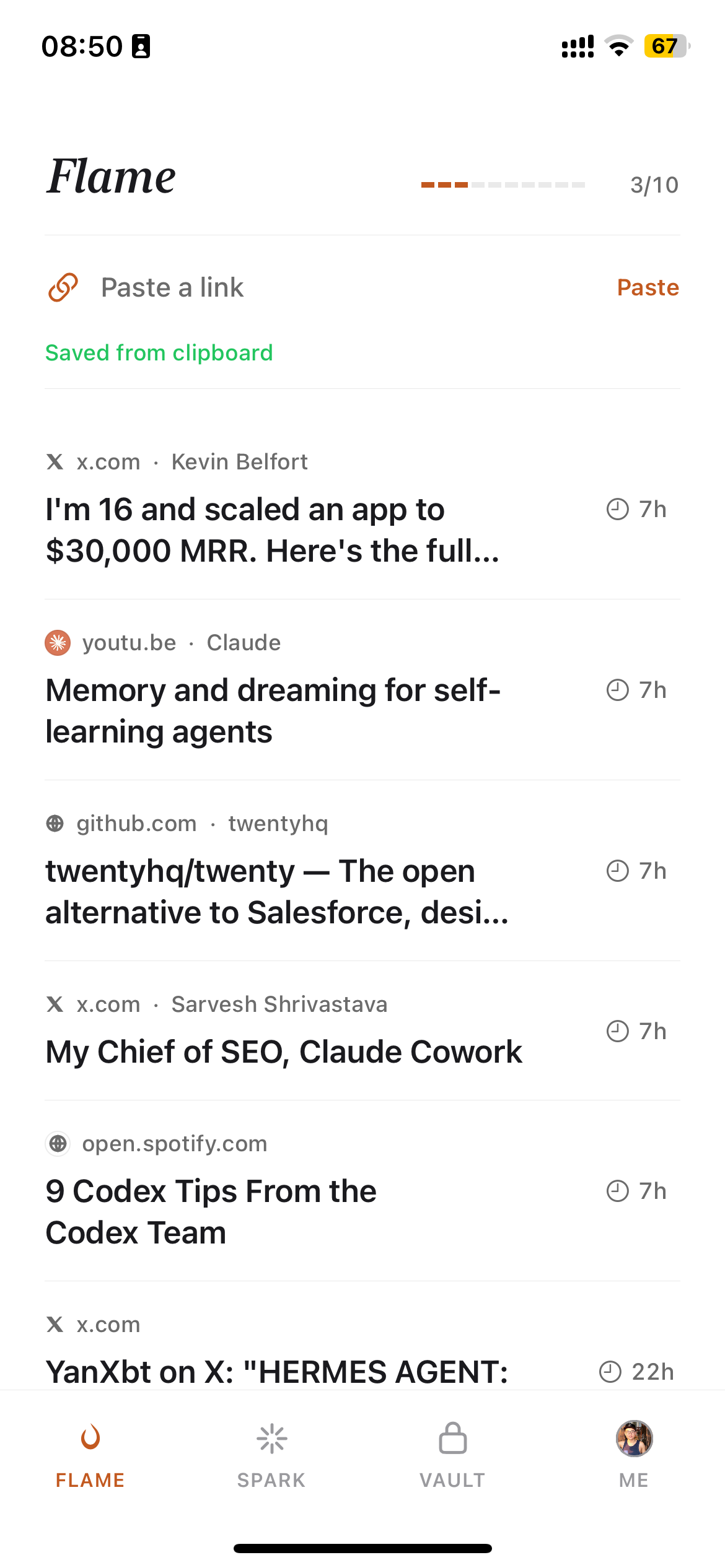
My iPhone has 847 saved articles. I've read maybe 30. The rest sit in a folder called "Read Later" that I open once a month, panic at the scroll length, and close again.
I built Burn 451 to solve this problem — and I've used or tested every serious iOS bookmark app while doing it. Here is an honest account of seven of them: what they actually do, who they're built for, and what each one gets wrong.
Why does the "best iOS bookmark app" question have no clean answer?
Because the category is split between two fundamentally different problems: people who save articles and want to read them later (read-later apps), and people who save links as reference material and want to find them again (bookmark managers). The best iOS app for problem one is often the worst for problem two.
Readwise Reader is the best iOS app for deep reading. GoodLinks is the best for native iPhone feel. Raindrop is the best for cross-platform sync. Burn 451 is the best if your problem is that you save things and never return to them. None of them is the universally correct answer.
The 7 best iOS bookmark apps, ranked
| # | App | Price | AI | Offline | Best for |
|---|---|---|---|---|---|
| 1 | Burn 451 | Free | ✅ | — | Save-and-triage + AI summaries + MCP integration |
| 2 | GoodLinks | $4.99 one-time | — | ✅ | Native iOS reading experience, offline, one-time purchase |
| 3 | Readwise Reader | $9.99/mo annual ($12.99 monthly) | ✅ | ✅ | Deep reading, highlights, spaced repetition review |
| 4 | Raindrop.io | Free / $3/month Pro | — | — | Cross-platform sync, collections, share with others |
| 5 | Instapaper | Free + Premium $5.99/mo or $59.99/yr | — | ✅ | Minimal text-only reading, long-established reliability |
| 6 | Safari Reading List | Free (built-in) | — | ✅ | Zero setup, offline caching, iCloud sync |
| 7 | Karakeep (self-hosted) | Free + server cost | ✅ | — | Self-hosting control, Docker-based, AI tagging |
"Why do I keep saving articles on my phone and never reading them?"
That question comes up on Hacker News every few months with hundreds of comments and no resolution. The answers cluster around the same three causes: saving is effortless and reading requires effort, so the ratio of saves to reads always trends toward infinity; the saved-article list becomes its own source of anxiety; and phone screens are where we save things but not where we do sustained reading.
Most iOS bookmark apps ignore this dynamic entirely. They make saving easier, which makes the problem worse. Burn 451 takes the opposite approach: articles auto-delete after 24 hours unless you open them, which forces a triage decision at save time instead of building a guilt pile that gets scrolled past forever.
If that mechanic sounds too aggressive, our full read-later app comparison covers alternatives that are gentler about queue management. If you want to understand the psychology first, read read-later guilt.
Burn 451 — best free iOS bookmark app with AI
Burn 451 has a free tier, has an iOS app, and offers AI summaries through the Pro subscription. The 24-hour burn timer is the defining feature: you save an article, you have until tomorrow to open it before it disappears. Articles you actually want to keep can be archived before the timer runs out.
The Burn 451 MCP server lets Claude, Cursor, and other MCP clients query your saved reading list in real time — useful if you use AI tools in your daily workflow and want your reading context accessible. No other free iOS bookmark app offers this. Download from the App Store and Burn 451 appears in the iOS share sheet immediately.
The catch: there's no offline article caching. Burn 451 stores metadata and AI summaries but not full article text. If you need to read without signal, GoodLinks or Readwise Reader are better picks.
GoodLinks — best native iOS reading experience
GoodLinks is a $4.99one-time purchase. It caches full article text on device, syncs via iCloud, and has no web version — it's built exclusively for Apple devices. The reading mode is clean and customizable. The share extension is fast. There's no AI and no collaboration features, which might be exactly what you want if you find AI summaries distracting.
The limitation is the Apple-only ecosystem. If you use Windows or Android at work, you can't access your GoodLinks saves from those devices. Raindrop or Burn 451 are better choices for cross-platform use.
Readwise Reader — best iOS app for deep readers
Readwise Reader at $9.99/mo annual ($12.99 monthly) is the premium end of the category. It caches articles for offline reading, surfaces highlights via spaced repetition, and the iOS app is as good as the web version. If you annotate and highlight as you read, Readwise is the best tool in the category at that specific job. The cost and depth of the product are both above average — it's overkill for someone who just wants to clear their queue.
Raindrop.io — best cross-platform iOS bookmark manager
Raindrop has one of the strongest free tiers: unlimited bookmarks, collections, browser extensions, and an iOS app that syncs in real time. The Pro tier at $3/month adds AI search and full-text content search. For someone who saves across iOS, Android, Windows, and web without wanting to think about it, Raindrop is the most frictionless cross-platform bookmark manager. It doesn't solve the reading problem — it just stores links elegantly. Start for free at raindrop.io.
What about Instapaper and Safari Reading List on iPhone?
Instapaper is reliable but slow-moving. The iOS app works, caches content offline, and has a clean reading mode. No per-article summaries, chat, library Q&A, or MCP; Premium does ship AI voices and TTS playlists, so "no AI" here means no LLM working over the content of your saves. Updates have been infrequent. Pricing verified on instapaper.com/premium on 2026-05-26: free tier (unlimited saves, but capped at 5 notes/month) or Premium at $5.99/mo or $59.99/yr (full-text search, permanent archive, PDF reader, unlimited notes, AI voices + TTS, Kindle send). Full breakdown: Instapaper pricing 2026 — free vs Premium decision.
Safari Reading List is the zero-effort option. It's built into iOS, syncs via iCloud, and caches article text for offline reading. The ceiling is low: no organization, no full-text search, no AI. It works adequately up to about 200 saves; past that, it becomes a scroll nightmare. For anything resembling a serious reading workflow, a dedicated app is worth the install.
For more on the Pocket shutdown and what it means for iPhone users, see our Pocket replacement guide. If you want a detailed look at the premium end of the category, Readwise Reader has the most complete public feature breakdown for iOS among the paid apps.
Related reading
- •Best AI Bookmark Manager 2026: I Tested 10, Ranked Honestly
- •Read Later iOS 2026: The iPhone Save-and-Read Workflow
- •Free Bookmark Manager 2026: 8 Actually-Free Options, Ranked
- •Best Read-Later App 2026: I Tested 10 So You Don't Have To
- •Pocket Replacement 2026: Best Alternatives After the Shutdown
- •Instapaper Pricing 2026: Free vs Premium ($5.99/mo · $59.99/yr) Breakdown
- •Burn 451 vs Raindrop.io: Which Bookmark Manager Is Right for You?
- •The Bookmark Graveyard: why we save without reading
- •Best Chrome Bookmark Extension 2026: 7 Tested (Now on Chrome Web Store)
- •Best Bookmark Manager 2026: cross-platform hub compared (8 tools)
Frequently asked questions
What is the best iOS bookmark app in 2026?
Burn 451 is the best iOS bookmark app in 2026 for users who save more than they read. It combines a free core workflow, AI summaries, a 24-hour burn timer that forces triage, and an MCP server for Claude integration. For pure article reading, Readwise Reader is the strongest if you pay $9.99/month on annual billing or $12.99 monthly. For visual bookmark organization on iPhone, GoodLinks is the smoothest native experience at $4.99 one-time. For sync across platforms without commitment, Raindrop's free tier covers the basics. There's no single winner — the right app depends on whether your problem is saving too much, reading too little, or organizing badly.
Is there a free iPhone bookmark app with AI included?
Burn 451's core save-and-decide workflow has a free tier, including the MCP server with usage limits. Pro ($4.99/mo, 7-day trial) adds AI Read summaries, vault digests, full-text search, and higher limits. The iOS app is available on the App Store now. Karakeep has an iOS companion app if you self-host, but you pay for the AI API calls separately. Most other AI-powered options — Readwise Reader, Mymind, Mem, Recall — also charge monthly.
Can I use Burn 451 on my iPhone?
Yes. Burn 451 has a native iOS app available on the App Store. You can save articles directly from Safari, Chrome, or another app by selecting Burn 451 in the iOS share sheet. Articles auto-delete after 24 hours if you haven't opened them, which forces you to decide: read now, or let it go. The app syncs with the web version and the MCP server in real time. The core workflow is free today.
How does GoodLinks compare to Raindrop.io on iPhone?
GoodLinks is a native iOS app built specifically for the iPhone and iPad reading experience — offline support, beautiful typography, iCloud sync, and a $4.99 one-time purchase. There's no web version, no collaboration features, and no AI. Raindrop is cross-platform (iOS, Android, Mac, Windows, web), has a free tier with unlimited bookmarks, and adds AI search on the Pro plan at $3/month. If you only use Apple devices and want a pure reading experience, GoodLinks wins. If you switch between platforms or share bookmarks with others, Raindrop is the better call.
Which iOS read-later app supports offline reading?
GoodLinks and Readwise Reader both cache article content for offline reading on iOS. GoodLinks downloads the full article text as part of its Safari extension save flow; it works on the subway with no signal. Readwise Reader caches articles you open, not ones you merely save. Instapaper has historically had offline support but its iOS app development has stalled. Burn 451 focuses on the save-and-decide experience rather than offline caching — it stores metadata and summaries but not full article text. Safari's built-in Reading List caches articles if you tap 'Add to Reading List' and have iOS sync enabled.
What happened to Pocket on iPhone?
Mozilla shut down Pocket on July 8, 2025 after years of declining investment and multiple failed monetization attempts. The iOS app stopped working the same day. Users who had the app installed saw a shutdown notice; export-only mode continued after closure. Pocket had tens of millions of users at peak and was the defining iOS read-later app for nearly a decade. The best iPhone alternatives to Pocket are Burn 451 (free core workflow, AI summaries), Readwise Reader ($9.99/month annual or $12.99 monthly, highlights + review), GoodLinks ($4.99 one-time, native iOS), and Raindrop (free tier available).
How do I save articles to Burn 451 on iPhone?
Burn 451 lets you save any article, link, or page directly from the iOS share sheet. Tap the share icon, find Burn 451, tap — the article is saved for triage. The iOS share sheet is also available from Chrome for iOS. On desktop, Burn 451 has a Chrome extension and a Safari for Mac extension. The MCP server integration (for Claude and Cursor) works on desktop only, not on the iOS app directly, but your iOS saves are immediately accessible from the MCP server if you're querying from a desktop client.
A free iOS bookmark workflow with AI summaries, a 24-hour timer, and MCP retrieval.
Try Burn 451 Free on iOS