Best AI Bookmark Manager 2026: 10 Apps Tested — Summary, Auto-Tag, MCP Query
Short version: "AI bookmark manager" in 2026 means three different jobs — summary (Readwise Reader, Matter, Glasp), auto-organization (Mymind, Karakeep, Raindrop), query / triage via MCP(Readwise MCP, Raindrop MCP, Karakeep MCP, Burn 451 MCP). Pick the job first; the tool follows. I built Burn 451 (skin in the game — Burn is in the "query / triage" row, never #1).
I built Burn 451 because my Chrome had 4,700 bookmarks I never opened. That gives me skin in this game, so take the ranking with that in mind. What I can give you that a generic listicle can't is the honest read on what these tools actually do when you use them for a few weeks. For the category definition and a direct product recommendation, start with the ai bookmark manager guide.
How I tested
- Real daily use, not demos. I build a read-later app for a living, so every tool here was run against my own reading on iPhone and Mac — most for weeks, several for months.
- Same questions for every tool: what does the AI actually do over your saves (summary, auto-tag, or query)? Can Claude/Cursor reach it over MCP? Can you export and leave? What does it really cost?
- Prices from vendor pricing pages (verified May 2026, dates noted inline), not from other listicles.
- Disclosure:I built Burn 451. It sits in the middle of the table, grouped by job — never row 1 — and its cons are listed like everyone else's.
"AI bookmark manager" is a confusing category in 2026. Readwise calls itself AI reading. Mymind calls itself AI memory. Karakeep calls itself AI tagging. Burn calls itself AI triage. All of them save links, all of them do something with a language model, and almost none of them mean the same thing by "AI." This guide covers ten tools, what their AI actually does, who each is for, and where each one breaks.
Quick decision — what is the AI for?
- A.Summarize and resurface what I save → Readwise Reader if you highlight (paid, ~$10/mo annual); Matter if you read on iPhone (real free tier).
- B.Auto-organize my saves so I don't file → Mymind (visual, $13/mo) or Karakeep (self-hosted, free). Both trade your folder UX for an AI that picks tags.
- C.Query my saves from Claude / Cursor over MCP, with a queue that pushes back → Burn 451 (free tier; Pro $4.99/mo adds AI) for read-later queue + vault + MCP retrieval. Recall if you want a knowledge graph instead of a queue. Disclosure: I built Burn 451.
- D.Want no LLM-over-content, just clean text→ Instapaper. Still works, still simple; no AI summaries / chat / library Q&A / MCP to opt out of (Premium does ship AI voices + TTS playlists on mobile).
Before you pick — 5 categories most people mash together
If your "AI bookmark manager" need is actually one of these, the right tool is different:
- 1.AI bookmark manager — saves links with AI tagging / summaries / chat across the library. (This page.) Burn 451, Karakeep, Mymind, Recall.
- 2.Read-it-later app — parsed reading view + queue, not just storage. → see the read-it-later app guide.
- 3.Web clipper — capture-only with extension UI. Browser bookmarks, Notion Web Clipper, Burn Web Clipper. Different shape from full manager.
- 4.Knowledge vault / PKM — Obsidian, Notion, Logseq. Bookmarks live as notes. Readwise Reader bridges this with PKM sync.
- 5.Save-to-AI / MCP workflow — your saved articles become context for Claude / Cursor / Windsurf via MCP. Burn 451 (decision loop), Raindrop Pro, Karakeep (self-host) all ship MCP now.
What "AI bookmark manager" actually means in 2026
Three different things, in ascending order of ambition.
AI as a summary layer.You save an article, the tool fetches it, an LLM writes a paragraph or three bullets. That's it. Readwise Reader, Matter, and Glasp all sit here. Useful, but the AI is doing work you could do with a browser extension and the OpenAI API in an afternoon. The value is that it's integrated into the save flow.
AI as an organization layer. The tool decides what the article is about and files it for you. Mymind picks a visual space. Karakeep picks tags. Raindrop Pro picks smart collections. The AI is replacing the folder-and-tag UX, which is the first UX most bookmark managers get wrong. This is the tier where power starts mattering.
AI as a query layer. You ask a question, the model answers from the corpus of what you saved. Burn 451 ships this through an MCP server— Claude Desktop and Cursor can run queries like "what did I save about context engineering this month" without leaving the chat. Recall ships it as an internal knowledge graph. Mem ships it as chat-with-your-notes. This is where the ceiling of the category lives, and it's the layer where most bookmark tools still haven't shown up.
The 10 tools, tested across three AI jobs
Below is the field grouped by what each app's AI actually does — summary (Readwise, Matter, Glasp), organization (Mymind, Karakeep, Raindrop), query / triage (Recall, Burn 451, Mem.ai), then the no-AI baseline (Instapaper). Within each job I list price, what the AI ships, who it fits, and where it breaks. Disclosure: I built Burn 451, so I put it in the middle of the table by job — not at the top.
| Tool | AI job | Price | AI summary | Full-text search | MCP |
|---|---|---|---|---|---|
| Readwise Reader | Summary | $9.99/mo annual, $12.99 monthly | Yes (Ghostreader) | Yes | Official (hosted) |
| Matter | Summary | Free / Premium | Yes (on save) | — | No |
| Glasp | Summary | Free / Pro tier | Yes | — | No |
| Mymind | Organization | $13 / mo | No — auto-tags instead | Search by meaning | No |
| Karakeep (Hoarder) | Organization | Free, self-hosted | Yes (your API key) | Yes | Yes (self-host) |
| Raindrop.io | Organization | Free + Pro (verify on raindrop.io/pro) | No per-article summary | AI search (Pro) | Official |
| Recall | Query / triage | $10 / mo | Yes | — | No |
| Burn 451 | Query / triage | Free | Pro ($4.99/mo) | Pro | Yes — 26 tools, free tier |
| Mem.ai | Query / triage | $15 / mo | Chat over notes | — | No |
| Instapaper | None | Free, $5.99/mo or $59.99/yr Premium | No | Premium | No |
Grouped by AI job, not ranked. Pricing verified against each vendor's public pricing page on 2026-05-23. “—” = not that tool's differentiator; not separately verified. What each AI does in detail is in the per-tool sections below.
Readwise Reader — AI for serious readers (now with MCP)
Price: $9.99/month billed annually ($12.99 monthly). AI: Ghostreader generates summaries, explanations, and outline notes. Chat-with-article pulls context from your highlights. Spaced repetition resurfaces highlights. MCP: official server at mcp2.readwise.io/mcp exposes highlights and Reader documents to MCP-compatible clients (docs.readwise.io/tools/mcp).
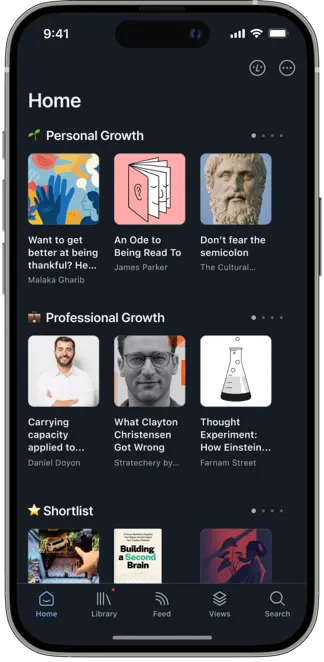
Readwise is the best tool in this guide if you actually read deeply and highlight as you go. Ghostreader's AI is thoughtful — it generates outlines and summaries that are genuinely useful, not marketing filler. The highlight review system keeps what you read alive weeks later. I've used Readwise on and off for three years.
Who it's for: the 10% who actually read the long articles they save. Where it loses:the other 90%. If you're a saver and not a reader, Readwise just gives you a nicer inbox for articles you'll never open. Also ~$10/month annual ($12.99 monthly) — recurring cost adds up if you don't use the highlight workflow.
Matter — AI for the iOS crowd
Price: Real free tier; Premium (HD TTS, AI Co-Reader, newsletter parsing, Kindle export). AI: auto-summary on save, AI-generated daily digest, read-aloud with decent voice quality on Premium.
Matter nails the mobile read-later experience better than anyone else. The typography is gorgeous, the swipe gestures are natural, the queue model is exactly right for phone reading. The AI summary on save is useful without being in the way. Premium adds AI highlights and personal newsletter digests.
Loses to Burn on: no MCP, no free full vault export. Loses to Readwise on:weaker highlight system, no spaced repetition. But for pure "save on phone, read on phone," Matter still wins.
Glasp — social AI highlights
Price: Free tier; Pro tier (paid). AI: AI summary on save, ChatGPT plugin, AI copilot.
Glasp is what you want if your reading benefits from a community. Highlights are public by default, you follow other readers, you see what they're thinking. For some people that's the entire point. For others it's a privacy trainwreck. Know which one you are before installing.
Beats the others on: social discovery and a visible ChatGPT plugin path. Loses on: privacy defaults, no MCP, the AI summary quality is noticeably weaker than Readwise or Burn.
Mymind — AI for visual thinkers
Price: $13 per month. AI: auto-tags, auto-categorizes into visual spaces, search by meaning.
Mymind refuses to show you a folder tree. There is no way to manually organize. You save, the AI files it into a space, and you browse the mood board. It is beautiful and it works if your brain works visually. It does not work if you want to run structured queries or share with a team.
Who it's for: designers, art directors, people who save for inspiration rather than reference. Where it loses:the $13 price is the highest in the guide excluding Mem, and the product will not answer queries like "show me everything about Karpathy from March." That's on purpose — but that purpose isn't most people's.
Karakeep (formerly Hoarder) — self-hosted AI
Price: Free if you self-host. AI: auto-tags and summarizes via OpenAI, Anthropic, or local Ollama.
Karakeep is the serious open-source option. Docker Compose to install, point it at your preferred model, done in roughly 30 minutes. Auto-tagging works, full-text search is fast, mobile clients are functional. You pay the API bills yourself, which for a single-user install is usually $1–3 per month on OpenAI's small models, or $0 if you run Ollama locally.
Beats Burn on: full data sovereignty, no external service can ever shut it down. Loses to Burn on:you're the sysadmin, mobile polish is weaker, no managed MCP, you do your own backups.
Raindrop.io — bookmark archive with official MCP
Price: Free tier is generous; Pro priced on raindrop.io/pro. AI: smart collections (Pro), AI full-text search (Pro), and an official MCP at api.raindrop.io/rest/v2/ai/mcp exposing bookmarks, collections, tags, and highlights (help.raindrop.io/integrations/mcp).
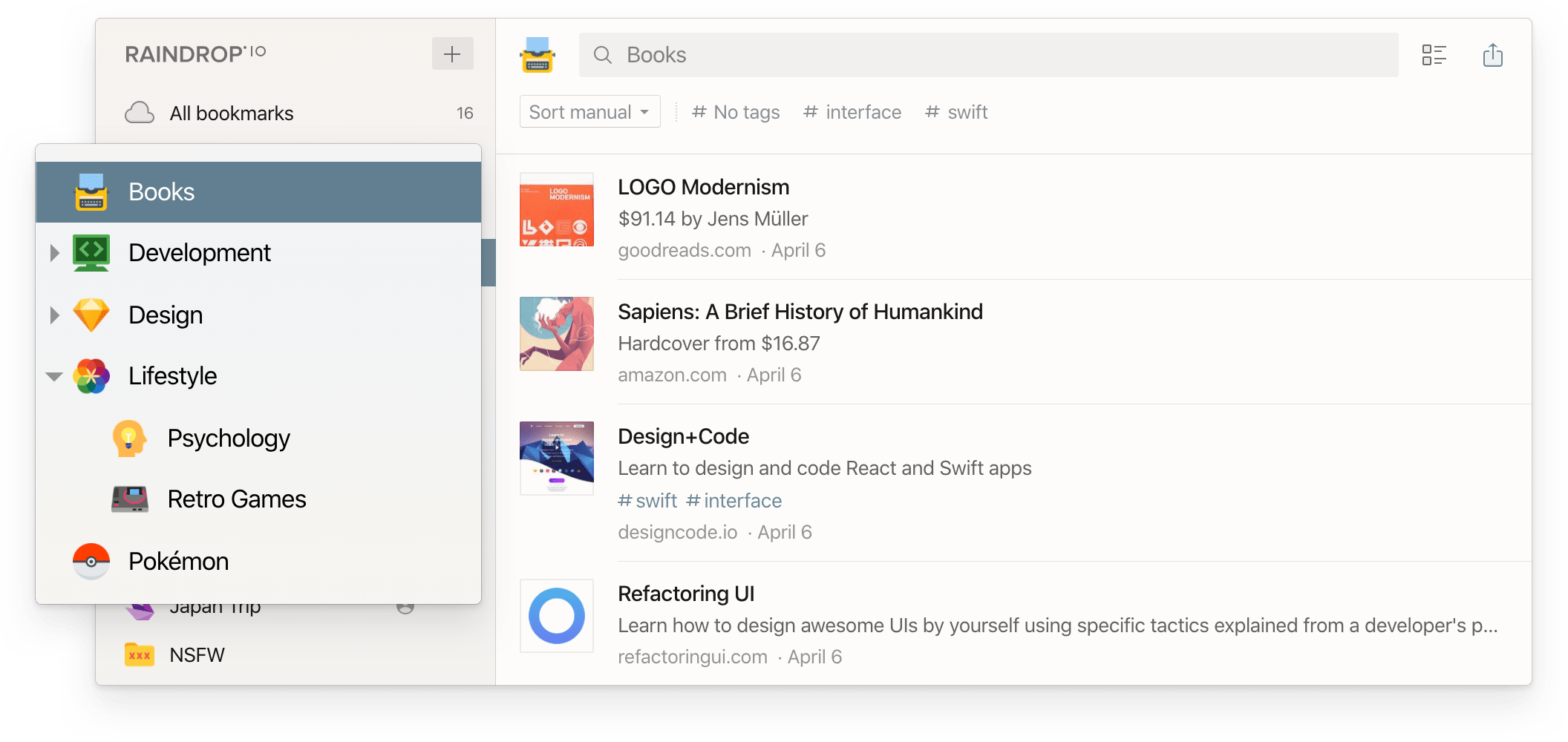
Raindrop is the functional survivor from the pre-AI era — rock-solid sync, every platform covered. The AI + MCP features are recent additions and they work, but the product DNA is still a long-term archive. If you want bookmarks Claude or Cursor can read, Raindrop's MCP gives you that over a full archive surface (vs. Burn's decision-loop surface).
Who it's for: organizers who want to run the UX themselves and treat AI as a bonus. Read more: Burn 451 vs Raindrop.io.
Recall — bookmarks as a knowledge graph
Price: $10 per month. AI: auto-summary, automatic wiki-style links between related saves, spaced repetition review.
Recall treats bookmarks as nodes in a Wikipedia-for-your-brain. Save an article about Karpathy, Recall auto-links it to other Karpathy saves, and the resulting graph is browsable like a mini wiki. When it works it's magical. When it doesn't, the graph is noisy. In my testing across ~200 saves, about 60% of the auto-links were useful, 40% were noise.
Who it's for: researchers who save densely in a few topics. Where it loses: generalist readers, because the graph needs density to be useful.
Burn 451 — AI triage and an MCP server
Price: Free tier + Pro $4.99/mo (14-day trial). AI (Pro): per-article summary, 3-bullet digest, vault-level editorial summaries, an MCP server with 26 tools for Claude and Cursor.
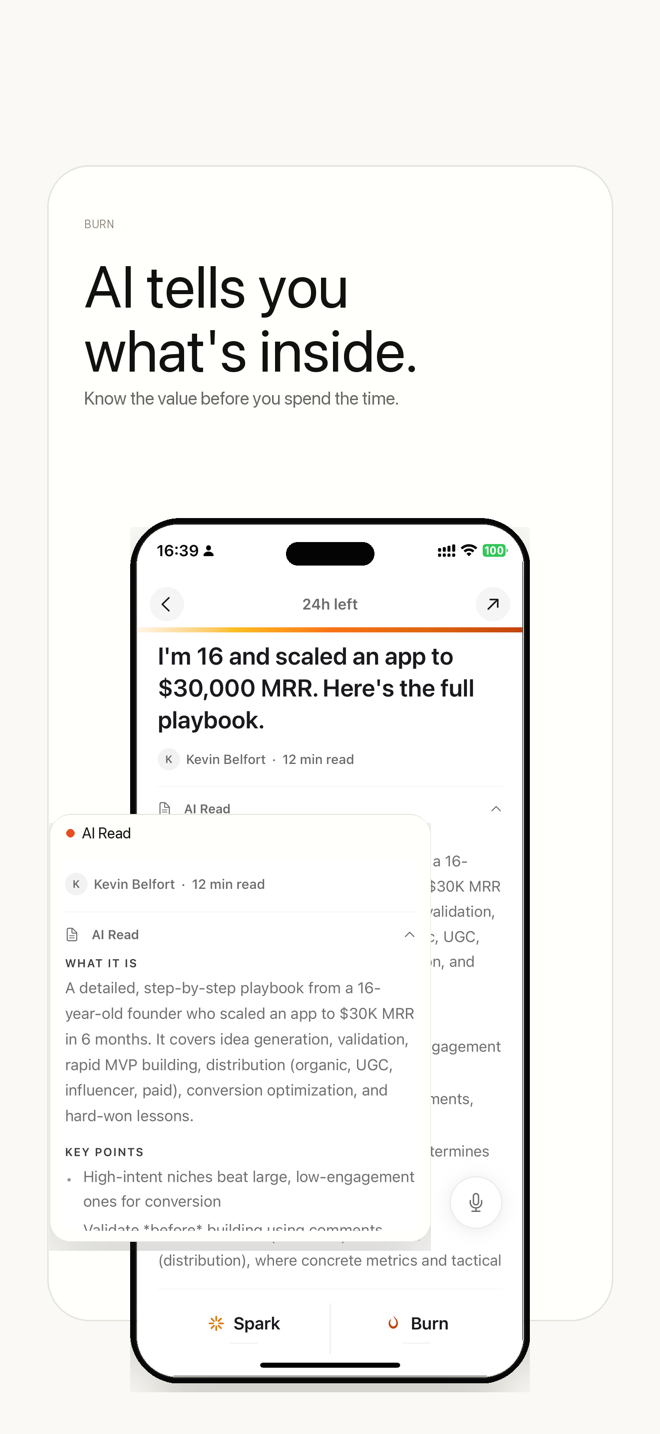
The core UX choice is the 24-hour timer. Articles auto-delete unless you finish or tag them, which kills the "save it forever, never read it" failure mode that built my 4,700-bookmark disaster. The vault is where anything you keep lives — curated collections with AI summaries on each article, queryable through the MCP server in real time. Nine live vaults covering Karpathy, Tiago Forte, Paul Graham, Simon Willison, context engineering.
Where it fits: read-later queue with a 24h decision pressure, vault for keeps, MCP retrieval from Claude / Cursor. Where it falls short: not a deep-reading or highlight tool (Readwise is stronger there); no native Android app; no PDF / EPUB / RSS; the 24h auto-delete is opinionated and not for everyone. I built it, so weigh this entry accordingly.
Mem.ai — a notes app with bookmarking
Price: $15 per month. AI: chat-with-notes, auto-connections, AI writing assistance.
Mem is more Notion-replacement than bookmark tool. You can save links and they become notes, and the AI does good work connecting them to other notes. But the center of gravity is writing, not saving. If you already have a notes app you like, Mem is not what you want for bookmarks. If you want one tool to replace both Notion and your bookmark manager, it's one of the stronger candidates here.
Instapaper — the LLM-free reading baseline
Price: Free, with a $5.99/mo or $59.99/yr Premium tier (instapaper.com/premium, verified 2026-05-26). AI:no per-article summaries, chat, library Q&A, or MCP. Premium does ship AI voices and text-to-speech playlists on mobile — so the "no AI" framing is narrow: no LLM working over the content of your saves.
Instapaper is included as the reference point. The reading product is the same shape it was in 2012, still working, still good at what it does. If every tool above added AI as decoration rather than real capability over your saved content, Instapaper would out-deliver them. That's worth knowing before you pay for AI features you won't use.
How to choose in 60 seconds
Decision tree:
- •You want to ask questions of your saved articles via Claude or Cursor: in 2026 several apps ship MCP — Readwise (highlights + Reader docs), Raindrop (bookmark archive), Karakeep (self-hosted), and Burn 451 (24h decision loop). Pick by what surface fits: Readwise if you highlight; Raindrop if you want a long-term archive; Burn if you want a triage queue Claude can see. Free tier today; Pro at $4.99/mo adds AI + lifts quotas.
- •You actually read deeply and highlight: Readwise Reader. ~$10/month annual ($12.99 monthly); no free plan but a 30-day trial. Worth it if you highlight regularly.
- •You save on phone, read on phone: Matter. The mobile experience is still the category leader.
- •You want zero manual organization and visual browsing: Mymind.
- •You want folders and tags you control, with optional AI: Raindrop.io.
- •You want to self-host everything: Karakeep. Plan for 30 minutes of setup.
- •You're saving for research on a few dense topics: Recall.
- •You want no LLM-over-content, just a clean read-later: Instapaper. Premium adds AI voices + TTS playlists on mobile but no summaries/chat/MCP.
Stop saving. Start reading.
Burn gives every link 24 hours — read it or it burns. Free to start.
Get it on the App Store →Is Karakeep worth self-hosting in 2026?
Yes — if you already run a homelab or are comfortable with Docker. Karakeep (formerly Hoarder) is the strongest self-hosted option in the category: 25,000+ GitHub stars, active community, iOS and Android apps, and AI tagging that runs against local Ollama models or any cloud LLM API. Setup takes under an hour via Docker Compose.
The calculus: self-hosting means your data never leaves your infrastructure, there is no hosted-service fee, and the service can't shut down without your input. The cost is ops overhead — server maintenance, Docker updates, monitoring. For a non-technical user, Burn 451 or Glasp gives equivalent AI features with zero setup.
Full breakdown: Karakeep self-hosted vs Burn 451 cloud — which is right for you?
What happened to Pocket, Omnivore, and Matter in 2025?
Two of them are gone. Pocket was shut down by Mozilla on July 8, 2025, after years of declining investment. Omnivore, the open-source option, was acquired by ElevenLabs and discontinued. Matter is still operating — it kept its free read-later tier and actively welcomed displaced Pocket users — but the iOS app's release cadence has slowed compared to its 2022–2023 pace, so I treat it as a stable but lightly maintained option rather than a fast-moving one.
The pattern worth taking seriously: consumer read-later tools without a clear business model have struggled. The tools that are growing are developer-tool adjacent (Burn 451, Readwise Reader), self-hosted (Karakeep), or deeply integrated into a paid ecosystem (Readwise Reader). The era of "free read-later with no monetization story" is largely over.
If you're weighing Matter: Matter app alternatives in 2026 — how the slower update pace changes the calculus. If you're coming from Pocket: the complete Pocket alternative guide. If you read primarily on iPhone: the iOS read-later workflow guide.
Which AI bookmark manager has the best free tier in 2026?
Burn 451 — real free tier today: the core 24-hour timer, Spark/Vault flow, and MCP server. AI Read summaries and full-text search are Pro at $4.99/mo (14-day trial), which also lifts quota caps. Glasp also has a meaningful free tier: unlimited web highlights, AI summaries, and a public profile. Karakeep is free if you self-host. Instapaper's free tier works without any LLM-over-content (no summaries / chat / library Q&A / MCP / LLM tagging); Premium ($5.99/mo or $59.99/yr) does ship AI voices + TTS playlists on mobile.
The paid tools that are worth their price: Readwise Reader at ~$10/month annual ($12.99 monthly) if you're a heavy reader who highlights; Recall at $10/month if you want a knowledge graph; Mymind at $13/month if you want a visual, AI-curated mind board. The rest — Matter Premium (real free tier exists; HD TTS / AI Co-Reader / newsletters / Kindle behind Premium), Raindrop Pro (current price on raindrop.io/pro; adds full-text search + permanent copies), Mem at $15/month — land in diminishing-returns territory relative to what you get free.
What makes a good AI bookmark organizer?
An AI bookmark organizer does three things that a regular bookmark manager doesn't: it understands what you saved (not just the URL), it surfaces saves before you forget them, and it connects related saves without you filing anything manually. Most tools in this list do one of those three. Almost none do all three.
The organizing layer is where they diverge most. Mymind auto-categorizes into visual spaces — no folders, no tags you set. Raindrop adds smart collections based on rules you define. Karakeep auto-tags using a local or API model on save. Burn 451 organizes differently: instead of categories, it asks you to decide within 24 hours whether something is worth keeping. The ones you keep become vault collections — searchable by Claude or any MCP client. That's the AI bookmark organizer play Burn is making: not "better filing," but "AI that can actually read what you filed."
What Burn 451's AI actually produced on 335 saved articles
Most "AI bookmark manager" pages, including this one, describe features. Here is the part nobody publishes: a measurement of what the AI actually generated. This is an internal benchmark on Burn's own saved-article corpus — the public vault collections you can open and read — not user data, and not a head-to-head against another tool. No competing product was run on this sample; every number below describes only Burn's own pipeline output, and it is reproducible from the repo.
| What Burn's AI produced | Coverage | Detail |
|---|---|---|
| Per-article AI summary | 318 / 335 (94.9%) | median 181 words (range 72–282) |
| 3-bullet takeaway digest | 206 / 335 (61.5%) | exactly 3 bullets where present |
| Extracted article text present | 335 / 335 (100%) | cleaned article body across 17 vaults |
The honest gaps
- •17 articles have no summary at all — all in one older, weaker vault that predates the summarization pipeline. Reported, not averaged away.
- •The 3-bullet digest covers 206 of 335 — 129 older articles have no digest layer: 112 carry summaries but no bullets, and the 17 no-summary articles above carry neither. That is why coverage is 61.5%, not 100%.
- •This is corpus data, not a leaderboard.It shows Burn's AI does the summarize-and-digest job at scale on real long-form writing — it does not claim Burn beats any tool above.
Methodology: the numbers come from a script that reads every article in Burn's vault corpus and counts AI summary coverage, summary length, 3-bullet digest coverage, and extracted-text coverage, with the failure cases listed above. It is re-runnable, so the figures move only as the corpus grows. Open the public vault collections to read the actual summaries the table is counting.
Why I built Burn 451
The short version: 4,700 Chrome bookmarks I never opened. I tried Pocket (shut down July 2025), Readwise (worked, but I didn't read enough to justify the ~$10/month annual recurring cost), Raindrop (beautiful, still didn't read anything), Instapaper (same). The pattern was that every tool optimized for saving. None of them fought the core problem — saving without reading.
Burn deletes by default. Saves expire in 24 hours unless you finish them or send them to the vault. That's the whole behavior design. Everything else — MCP server, vault collections, AI summaries — followed from "once you do actually read something, what should happen to it." The answer turned out to be: turn it into a queryable knowledge base that Claude can read.
This is the pattern Karpathy described in his LLM Wiki gist — raw saves become curated markdown become queryable context. I didn't know I was building that when I started. I was just trying not to drown in bookmarks.
If any of that sounds useful, Burn has a real free tier today (the core 24-hour timer + MCP server); AI Read summaries and full-text search are Pro at $4.99/mo (14-day trial). Try it free. If the 24-hour delete sounds terrifying, I'd start with Readwise Reader or Raindrop — both are built for archive-style workflows.
Related reading
- •Best Read-Later App 2026: I Tested 10 So You Don't Have To
- •Pocket Alternative 2026: The Complete Guide
- •Matter App Alternatives 2026: 6 Read-Later Apps Compared
- •Best Readwise Reader Alternative 2026: 6 Apps Compared
- •Best Raindrop Alternatives 2026: 6 Apps for Different Needs
- •Read Later iOS 2026: The iPhone Save-and-Read Workflow
- •Best Bookmark Manager 2026: 8 tools compared by behavior, not just features
- •Karakeep Self-Hosted vs Burn 451 Cloud: Which Is Right for You?
- •Burn 451 vs Readwise Reader
- •AI bookmark management concept hub
- •Why your bookmark archive is a Karpathy LLM Wiki
- •Best iOS Bookmark App 2026: 7 Tested on iPhone (Honest Rankings)
- •Best Chrome Bookmark Extension 2026: 7 Tested (Now on Chrome Web Store)
- •Best AI Summarizer for Articles 2026: 6 Tools Ranked by Accuracy and Speed
- •Bookmark Management Guide 2026: how to actually organize what you save
- •Building Burn's MCP Server: 3 Patterns for AI-Readable Bookmarks
- •Readwise Alternatives 2026: 6 apps when highlights alone aren't enough
- •AI Bookmark Organizer 2026: 5 apps that auto-tag and summarize what you save
- •AI Read Later App 2026: which apps actually help you read what you save
- •LLM knowledge bases for AI-assisted research
- •Personal knowledge base systems beyond bookmark folders
Frequently asked questions
What makes a bookmark manager an 'AI bookmark manager'?
Three different things, depending on which tool you ask. Most use AI as a summary layer that generates a paragraph when you save an article. A smaller group uses AI as an organization layer that auto-tags or auto-categorizes saves. The smallest group uses AI as a query layer — you ask a question, the model answers from what you saved. Readwise and Matter sit in the first bucket, Mymind and Karakeep in the second, Burn 451 and Recall in the third. The third layer is where the category is still being figured out.
Is there a free AI bookmark manager that actually works?
Yes, three. Burn 451 has a real free tier today — save, vault digests, and an MCP server that lets Claude or Cursor query your saves in real time. AI Read summaries and full-text search are Pro at $4.99/mo (14-day trial); the free tier keeps the core save-and-triage flow. Karakeep (formerly Hoarder) is free if you self-host — runs in Docker, auto-tags with a local or API-based model, and ships an MCP server. Glasp has a free tier with AI highlight summaries and social reading. Everything else with meaningful AI features starts at $3–15 per month.
What's the difference between Readwise Reader and Burn 451?
Readwise Reader is built around highlights and long-term review. You save an article, you highlight while reading, the highlights resurface in daily digests via spaced repetition. It runs ~$10/month billed annually ($12.99 monthly) and is the best tool in its class if you actually read deeply. Burn 451 is built around the opposite problem — the articles you saved but never read. Saves auto-delete after 24 hours unless you finish them, which forces triage. Burn has a real free tier today (core 24-hour timer, Spark/Vault flow, MCP server); AI Read summaries are Pro at $4.99/mo (14-day trial). It has an iOS app and share sheet, web app, Chrome extension, and Safari for Mac extension. Neither is strictly better. They solve different failure modes.
Which AI bookmark manager works with ChatGPT or Claude?
In 2026 MCP is no longer rare. Readwise ships an official MCP at mcp2.readwise.io/mcp over highlights and Reader documents (docs.readwise.io/tools/mcp). Raindrop ships an official MCP at api.raindrop.io/rest/v2/ai/mcp over bookmarks, collections, tags, and highlights (help.raindrop.io/integrations/mcp). Karakeep ships an MCP server (useful for self-hosted workflows). Burn 451 ships burn-mcp-server on npm with 26 tools — what's different is the surface it exposes: the Flame/Spark/Vault decision loop and 24-hour triage state, not a flat archive index. Matter, Mymind, Glasp, Recall, Mem, and Instapaper expose REST APIs of varying completeness or require manual export. Pick on what surface you want the model to see (highlights / bookmarks / decision loop), not on protocol availability.
Can I export my bookmarks if I want to switch tools later?
Only some of them. Burn 451 exports as markdown or JSON at any time, per collection or the full archive. Raindrop and Instapaper export in standard bookmark formats. Karakeep exports raw JSON since it's self-hosted. Readwise has a full export API. Matter exports highlights but not the full article library in a clean format. Mymind and Mem have thin export stories — if switching matters to you, test the export before committing. Glasp and Recall export individual items but not bulk archives cleanly.
Is a self-hosted AI bookmark manager worth the setup?
Only if you already run a homelab or comfortable with Docker. Karakeep is the serious option — install via Docker Compose, point it at OpenAI or a local Ollama model, done in about 30 minutes. You get auto-tagging, AI summaries, full-text search, and a clean web UI. The catch is you pay for the AI API calls yourself, you maintain updates, and mobile support is thin. For 80% of people, a hosted free option like Burn 451 or Glasp ships the same core features without the ops overhead.
How does Mymind's AI work compared to the others?
Mymind positions itself as 'a thoughtful extension of your mind' and refuses to expose any organizing UI — no folders, no tags you set manually. You save, the AI auto-categorizes into visual spaces, and you search by query or browse the mood board. It costs $13 per month. The product is beautiful and the target user is a visual thinker who hates file systems. It is not the tool for someone who wants to run queries like 'show me everything I saved about Karpathy in March'. Burn, Readwise, Karakeep are better for that.
Which tool should a developer pick?
Depends on what you want the AI to see. Burn 451 if you want a 24h triage queue plus an MCP over the decision loop. Karakeep if you insist on self-hosting (MCP + Docker). Readwise Reader if you care more about reading deeply and want MCP over highlights + Reader documents. Raindrop if you want a long-term bookmark archive with an official MCP over collections/tags. Skip Mymind, Matter, Glasp, and Mem for developer tooling — their APIs are either read-only, undocumented, or both. Recall has a clean API but no MCP. Instapaper has the oldest API in the category, still works, and has no LLM-over-content layer (no summaries / chat / library Q&A / MCP), though Premium does ship AI voices + TTS playlists.
Try the one I built. Free tier — iOS app and share sheet, web app, Chrome extension, Safari for Mac extension, and MCP server included.