Loop Engineering Helped Me Turn X Into a Second Brain
By Fisher · @hawking520 · I built Burn 451 — a read-later app built around triage, not storage
June 20, 2026 · 8 min read
I've saved thousands of articles. Almost none of them changed what I did.
The bookmark graveyard
You see something good on X. A thread on Claude Code agent patterns, a framework for GTM without a sales team, a breakdown of how someone got 10k followers in 90 days. You tap the bookmark. You feel like you've done something. You move on.
Three weeks later that bookmark is buried under 200 others. You never open it again. The queue grows. The articles decay. The satisfaction of saving something was indistinguishable from actually using it.
This is the read-later trap, and I fell into it for years.
The real problem isn't that I don't have time to read. I read plenty. The problem is that reading a saved article doesn't automatically become anything. You finish it — if you finish it — and then nothing happens. No task created. No idea captured. No note filed. You close the tab and carry the vague sense that you learned something, which is probably not true.
Saving is the illusion of doing something.
That's what I wanted to fix.
The insight: it's a routing problem
The missing step isn't more reading time. It's routing.
Every saved article should become one of three things: something to act on, something to write about, or something to keep. The problem is I had no system for making that call, so everything defaulted to "keep" — which really means "forget."
I used Loop Engineering as the design lens to build the workflow. Addy Osmani framed the shift in June 2026 as moving from writing prompts to building loops. Boris Cherny, who built Claude Code, captured the same idea: the move from writing prompts to running loops.
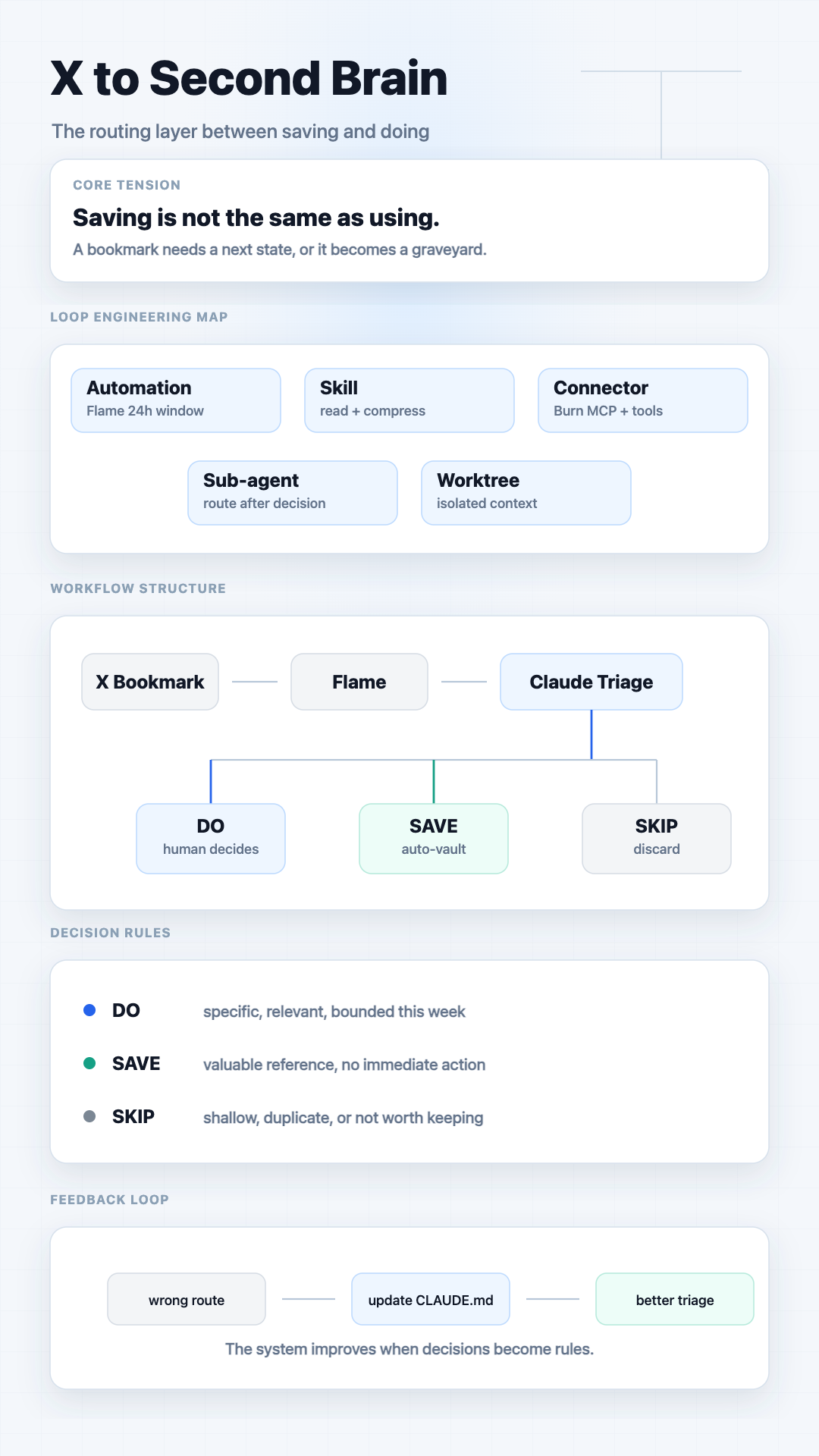
Loop Engineering gives you 5 design questions. I answered each one for my bookmark problem:
- Automation: What triggers the loop? → A new bookmark lands in the 24h Flame window
- Skill: What does the loop know how to do? → Read content, compress to 2 sentences, check vault for duplicates
- Connector: What does it connect to? → bookmark MCP, Telegram, Notion, Obsidian, Linear, or a vault
- Sub-agent: What runs independently? → The routing execution after I make a decision
- Worktree: How does it handle multiple items? → Each article gets its own isolated context; multiple can run in parallel
Answering those 5 questions designed the workflow for me.
The workflow, step by step
Here's exactly what I designed.
Step 1: Save into a 24-hour triage window
When I bookmark something on X, it goes into a 24-hour triage window called Flame. Burn 451 is a read-later app built around triage, not storage. Flame forces a decision within 24 hours; the vault keeps only the references that survive that filter.
The 24-hour window is intentional. It forces me to actually make a decision about everything I save, instead of letting things pile up forever. If I don't triage it, it expires. That constraint is what the previous system was missing.
Step 2: Claude reads and compresses
When I'm ready to triage — usually first thing in the morning, takes 3 minutes — I open Claude Code in the x-to-second-brain directory. Claude connects through an MCP server, reads each saved item, checks whether the topic already exists in my vault, and presents a 2-sentence summary:
TITLE: How to Build a GTM Team on Claude Code You Can Run Alone
SUMMARY: Seat-by-seat guide to replacing a GTM team with Claude Code agents.
Each "seat" is a job to do, wired to an agent on a schedule.
VAULT MATCH: none
I never re-read the original article. I read the summary.
The connector is pluggable: terminal works by default; Telegram, Discord, or Lark can be wired in later.
Step 3: I decide what to do with it
SAVE items auto-route to the vault. SKIP items are discarded. I never see them.
For items Claude flags as DO, one question: what type of action?
- a — write about this on X
- b — try this myself
That's the only decision. I'm not sorting, not tagging, not re-reading. Claude already filtered out the noise.
Step 4: Claude routes
Based on my reply:
- a → Notion draft with the title, source URL, and a suggested X angle
- b → Linear issue with the specific experiment to run
A session for 5-10 items takes about 3 minutes — but most of that is Claude running, not me deciding. The actual decisions are seconds each.
The three tools
Three tools make this work. Each is swappable.
Claude Code is the runner. It reads the MCP tools, executes the routing workflow, and routes based on your decision. The logic lives in a CLAUDE.mdfile you write yourself — your task types, your destinations. There's nothing proprietary about it. It's just a workflow file that Claude follows.
The capture layer is what makes the loop work. The 24h Flame window forces discipline: everything gets triaged, nothing piles up forever. The MCP server (npx burn-mcp-server) is how Claude reads your saved items.
For those who haven't used it: Burn 451 is a read-later tool and knowledge vault. You save articles, have 24 hours to triage them, and whatever you want to keep goes into a permanent vault. It has an MCP server so AI agents can read your queue directly. Free tier at burn451.cloud.
If you're already on Readwise Reader, it also has an MCP server and works as a drop-in replacement. The workflow doesn't care which capture tool you use.
Obsidian or Notion are the routing destinations. Notion is where my draft queue lives — content ideas land there as stubs with a title and angle. Obsidian works if you prefer local-first — it handles both draft queues and vault. Either works. The workflow is destination-agnostic.
Closing the loop
This is where it gets interesting after a few weeks of running it.
Patterns start showing up in your own decisions. I noticed I was pressing b(do this myself) every time an article was about Claude Code tooling. That's a rule worth writing into my CLAUDE.md — so Claude can pre-suggest it without waiting for my input. The loop teaches me what I already believe, and then I can encode that belief into the system.
The loop also improves through use. If Claude's summary missed the point of an article, I update the compression prompt. If a routing destination changed — say I stopped using Linear for a period — I swap it. The workflow is just a text file. Changing it takes 30 seconds.
SAVE and SKIP are already automatic — Claude handles them without asking. What gets better over time: the DO classification. As I encode patterns into CLAUDE.md (Claude Code tooling → always try-it; second brain content → always write), fewer items need my attention at all. You can progressively remove yourself from the parts of the loop you've already calibrated.
The end state: a loop that processes your X bookmark queue, surfaces only the items worth a decision, and routes everything else automatically. You spend 3 minutes a day on what used to decay in a list of 200.
I'm not there yet. But I'm closer every week.
The point
X is the best real-time knowledge stream most of us have access to. The problem was never access. It was that saving something and acting on something were two completely separate workflows with nothing connecting them.
This is the connection layer.
The repo is open source and free: github.com/Fisher521/x-to-second-brain — includes the CLAUDE.md workflow file, the classification prompt, an MCP config template, and a working example run you can follow.
Related: Read-Later App with MCP · Building Burn's MCP Server · Vault as LLM Wiki.
Want the same capture layer I used in this workflow?
Try Burn 451 free →