Best Bookmark Manager 2026: 8 Tools Compared by Behavior, Not Just Features
By Fisher · @hawking520 · I built Burn 451 — tested every app in this guide
May 21, 2026 · updated May 22, 2026 · 9 min read
Every "best bookmark manager 2026" roundup compares features. Feature tables miss what actually matters: do you ever come back to what you saved? I built a bookmark manager (Burn 451) after my own saved-articles pile broke me, then tested every serious option still shipping in 2026. This is what I learned — ranked by behavior, not by how many tags the tool can apply.
Decision block
Which one fits you?
- Pick Burn 451 if your saved-articles pile keeps growing and you almost never come back. The 24-hour timer is the point — it forces read, vault, or burn on every save. Free tier today; Pro is $4.99/mo (14-day trial).
- Pick Raindrop if you want a clean visual archive of links you reference occasionally — recipes, gear, docs, research. Free tier covers unlimited bookmarks; AI tagging is a paid add-on.
- Pick Readwise Reader if highlighting, ebook / PDF reading, or a Kindle → highlight workflow is part of your weekly habit. $9.99/mo on annual ($12.99/mo monthly), 30-day full-access trial.
- Pick Karakeep or Linkwardenif you want full data ownership and don't mind running a Docker container.
- Pick Pinboardif you want a quiet, text-only archive that'll outlive every venture-backed app on this list. $22/year for basic service.
- Pick none of the aboveif a Chrome / Safari folder structure plus a notes app already works for you — that's an honest answer some weeks.
What people on X are actually picking after Pocket's shutdown
One quote from this past summer captures the rough state of the category in a single sentence — worth weighing before you read the longer tool-by-tool review below.
"Raindrop. pinboard isn't as good anymore. Mozilla ruined and then killed pocket. There are also reasonably good oss/self hostable..."
— @ishanjain28 in a developer thread on bookmark managers, 2025-08-31
This single thread is one data point — not a survey — but it sketches the four shapes I keep seeing in post-Pocket bookmark-manager threads on X: Raindrop as the common default, Pinboard as the "was good, faded" veteran, Pocket as the cautionary tale, self-hosted (Karakeep / Linkwarden / Wallabag) as the third lane for users who want full control. I'd add one shape this quote skips: the read-later-with-timer category (Burn, Instapaper, Readwise Reader) where the goal isn't a tidy archive but actually finishing what you save. Shutdown risk matters too, so compare replacements for Omnivore after its closure before trusting another hosted archive. The 8-tool review below covers all four shapes.
What counts as the best bookmark manager in 2026?
The category split in the last two years. "Bookmark manager" used to mean a single category — save links, organize in folders, find them later. After Mozilla shut Pocket down in July 2025 and the AI-native tools showed up, three distinct shapes emerged:
- Reference archive — Raindrop, Pinboard, native browser bookmarks. Goal: a permanent searchable archive you consult occasionally.
- Read-later queue — Burn 451, Instapaper, Readwise Reader. Goal: process articles you save before they expire from being interesting.
- Self-hosted vault — Karakeep, Linkwarden, Wallabag. Goal: full data control + offline-first ownership.
Most "best bookmark manager" lists treat these as competing for one slot. They are not — they solve different problems. The honest first step is figuring out which shape you actually need. RSS readers are a separate job; if subscriptions are why you are here, compare a Feedly alternative before choosing a bookmark manager. The decision block above is the short version; the rest of this page is the longer version with each tool tested.
The 8 bookmark managers I tested in 2026
I picked the tools by what people actually search for and what still ships well in 2026 — not by what was popular in 2022. Here they are in the order I'd recommend evaluating, given a read-later-heavy save pattern.
1. Burn 451 — the read-later app with a vault
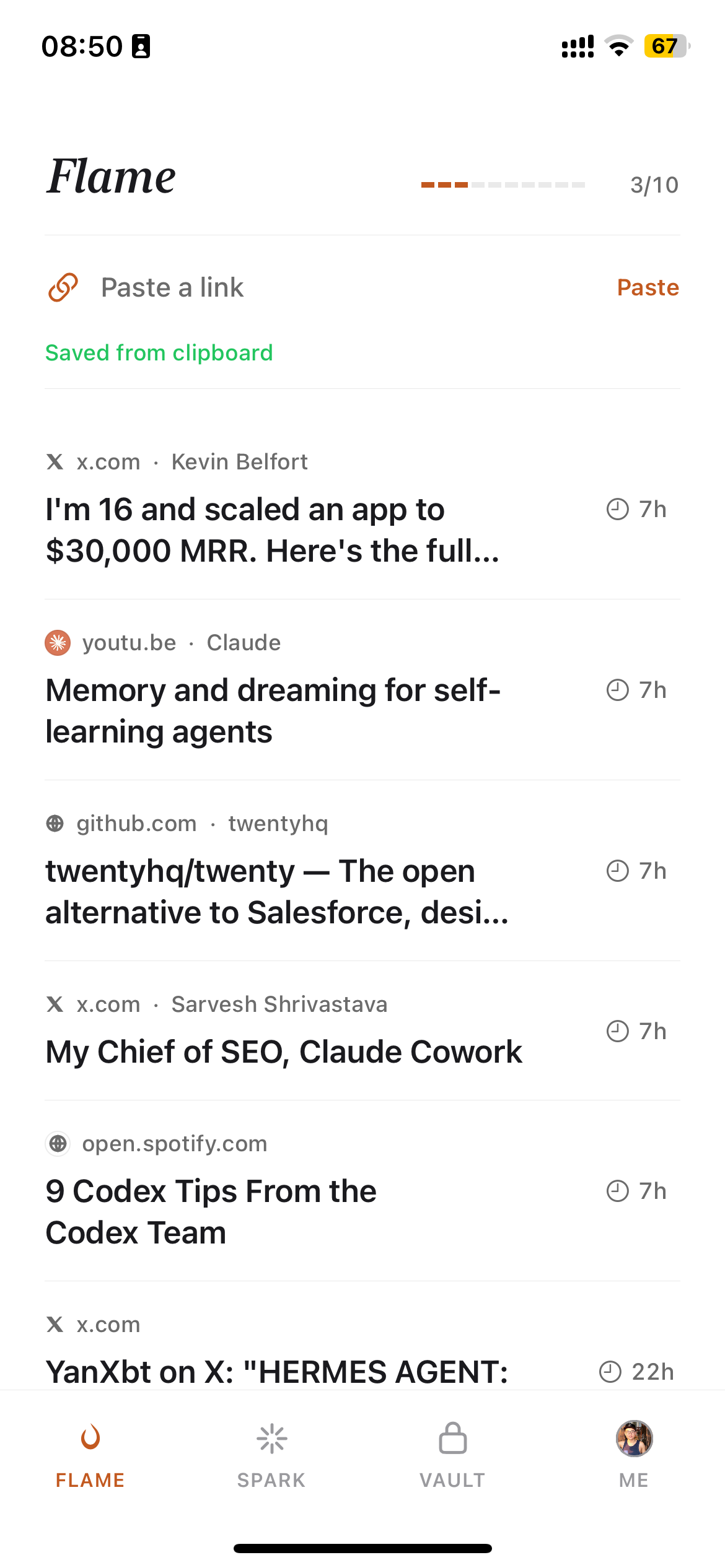
Price: Free tier + Pro $4.99/mo (14-day trial). AI (Pro): 150-300 word summary on every save + auto-tagging. Platforms: iOS, Chrome extension, Safari extension for Mac, web app. No native Android app. MCP: Yes (burn-mcp-server, npm).
I built Burn after my own saved-articles pile got to 2,847 items I would never read. The core idea: every save has a 24-hour countdown. Read it before the timer expires, vault it for permanent keep, or it deletes automatically. The first week is uncomfortable. By week three, the queue stabilizes at 20-30 items I actually intend to read. The vault is the bookmark-manager half — searchable, AI-summarized, queryable from Claude / Cursor via MCP.
Beats the others on: behavior change for save-and-forget patterns. MCP-native retrieval. AI summaries on Pro. Loses on: no native Android app, no PDF / EPUB / newsletter ingestion, no highlights. If the timer feels punishing instead of useful, the product is not for you. Burn for iOS · Chrome extension.
2. Raindrop — the cleanest visual archive on a free tier
Price: Free unlimited bookmarks; AI features on Pro. AI: Auto-suggested tags on Pro. Platforms: iOS, Android, browser extensions, web. MCP: No.
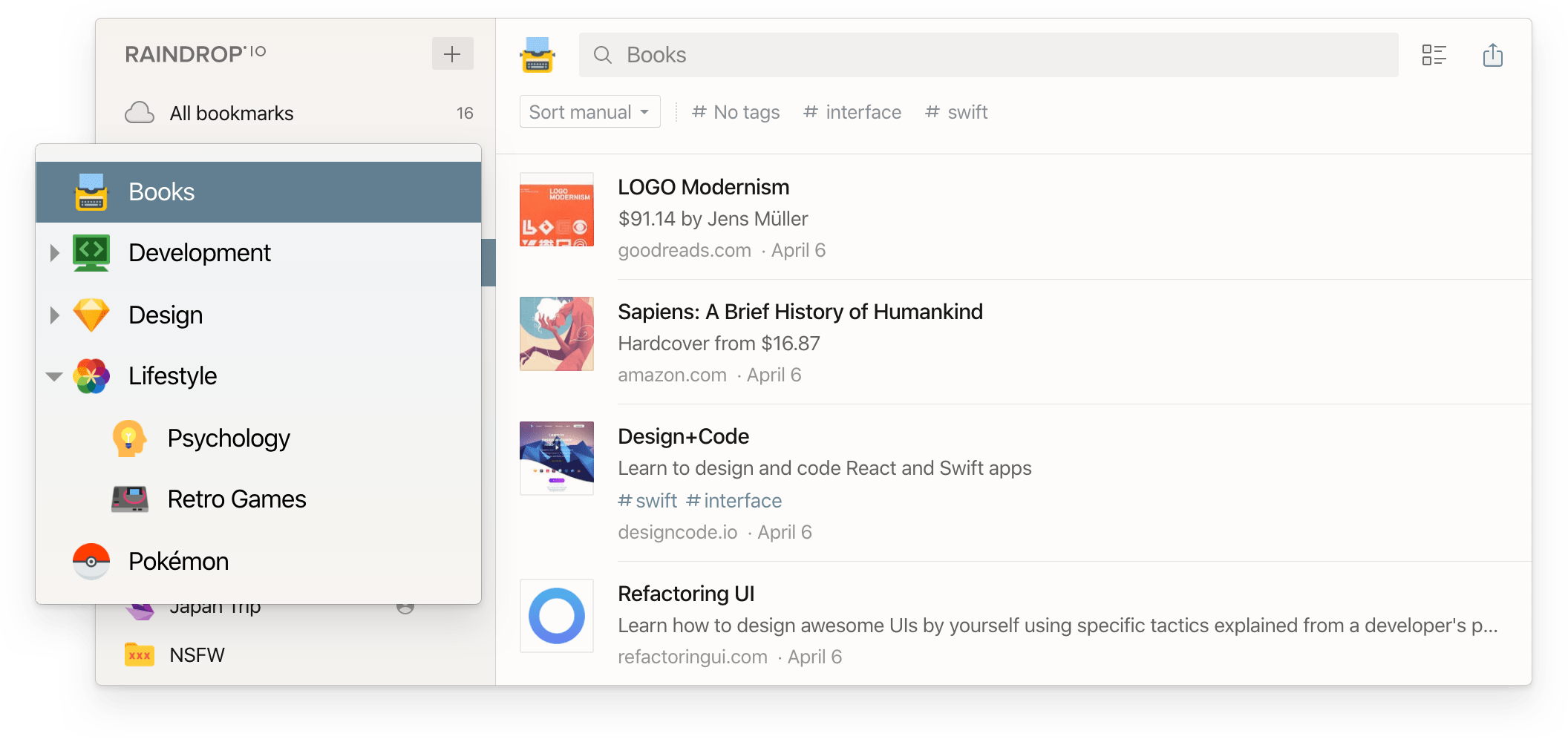
Raindrop is the bookmark manager people actually use as a bookmark manager. The free tier is the most generous in the category — unlimited bookmarks, full cross-device sync, browser extensions on every major browser. The visual archive UI is the cleanest among the closed-source options. If your real need is a reference archive of links you check occasionally, this is the strongest free pick in 2026. See our Burn vs Raindrop comparison for a deeper head-to-head, and Raindrop vs Pocket 2026 for the Pocket-migration angle.
Beats the others on: free-tier generosity, visual UI, cross-platform parity. Loses on:AI features locked behind Pro; the "save everything" pattern Raindrop enables is the same pattern that creates the bookmark graveyard in the first place.
3. Readwise Reader — the highlighter's bookmark manager
Price: $9.99/mo on annual ($12.99/mo monthly), 30-day full-access trial. AI: Ghostreader chat over highlights, AI summaries. Platforms: iOS, Android, browser extensions, web. MCP: Yes — official server at mcp2.readwise.io/mcp exposes highlights + Reader documents (docs.readwise.io/tools/mcp).
Readwise Reader is the most full-featured paid product in the read-later / bookmark-manager overlap zone. RSS, newsletters, PDFs, EPUBs, spaced-repetition review, Ghostreader, mature Obsidian / Notion plugins. If you actually highlight what you read and want spaced repetition over your notes, this is the right tool. Official pricing. See Burn vs Readwise Reader for the head-to-head decision block.
Beats the others on: highlights pipeline, PDF / EPUB / newsletter ingestion, Obsidian sync, and official MCP over highlights + Reader docs. Loses on:price (several times Pinboard's basic annual plan), no 24h triage forcing function — the open-archive model lets the pile accumulate if you don't actively highlight.
4. Karakeep — the maintained self-hosted choice
Price: Free software, you pay server costs. AI: Local-LLM auto-tagging supported. Platforms: Web, browser extensions, iOS, Android. MCP: No first-party MCP; community work exists.
Karakeep (formerly Hoarder) is the most actively maintained self-hosted bookmark manager in 2026. Runs in Docker, accepts Pocket HTML import, exposes a clean API, and adds local-LLM auto-tagging that doesn't require sending links to a third-party model. If you got burned by Pocket's shutdown and want to never depend on a centralized service again, Karakeep is the cleanest exit path.
Beats the others on: data ownership, local AI, Pocket import quality. Loses on: setup tax (Docker, reverse proxy, backups, updates), less plug-and-play mobile setup than hosted apps, no MCP.
5. Linkwarden — self-hosted with archival emphasis
Price: Free self-hosted or paid cloud, starting at $3/mo on annual billing. AI: Limited. Platforms: Web + browser extensions. MCP: No.
Linkwarden focuses on archival quality — full-page captures (HTML, screenshot, PDF) on every save, so a saved link survives the source going down. If you save academic references, evidence-trail material, or anything that has historically rotted on you, Linkwarden is the strongest archival shape. The paid cloud tier exists if you don't want to self-host.
Beats the others on: full-page archival quality, source-resilience. Loses on: weaker AI features compared to Karakeep, smaller community, mobile experience is web-only.
6. Pinboard — the long-survival bet
Price: $22/year basic service; $39/year archival account. AI: None. Platforms: Web + community apps. MCP: No.
Pinboard is the bookmark manager that has outlived almost every competitor since 2009. Text-only, single-developer-operated, no venture funding, no AI, no design refresh. That is the entire pitch — it will probably still exist in 2030 when half the apps on this list are shut down. If you treat bookmarks as a permanent archive and want to never migrate again, Pinboard is the rational choice.
Beats the others on: longevity, minimalism, low-cost paid alignment. Loses on: UX feels like 2010, no AI, no mobile app, no surfacing layer — finding old links is grep, not semantic search.
7. Instapaper — the AI-free read-later baseline
Price: Free with light limits; Premium $5.99/mo or $59.99/yr for unlimited notes, full-text search, permanent archive, PDF reader, Kindle send, and AI voices + TTS playlists on mobile (per instapaper.com/premium, verified 2026-05-26). AI: No LLM-over-content (no summaries / chat / library Q&A / MCP / LLM tagging); Premium ships AI voices + TTS playlists on mobile. Platforms: iOS, Android, web. MCP: No.
Instapaper is the 2008 original. It still works. The free tier covers offline reading, the highlights are clean, the typography is good. There is no LLM-over-content layer here — no per-article summary on save, no chat over your library, no library Q&A, no MCP, no LLM-powered tagging; Premium does ship AI voices + TTS playlists on mobile. That's either a feature (privacy, predictability) or a limitation (you do all the content triage yourself). If you save 5-10 articles a week and read them, Instapaper is fine. See Instapaper alternative comparison if you outgrow the free tier.
Beats the others on: simplicity, longevity, mature typography. Loses on:no LLM-over-content (no summaries / chat / library Q&A / MCP / LLM tagging — Premium does ship AI voices + TTS playlists on mobile), slow product development, the open archive lets the pile accumulate.
8. Native Chrome / Safari bookmarks — the default
Price: Free. AI: None. Platforms: Whatever browser. MCP: No.
The default is fine for under 100 bookmarks. The default is not fine once a folder structure stops being mentally retrievable. Once you save more than you can remember, native bookmarks become a folder you never open. A dedicated bookmark manager fixes this with full-text search, AI summaries, or — Burn's approach — by deleting saves you don't actually read. See our Chrome bookmark manager page for replacing the default, or best Chrome bookmark extension for the extension-specific cut.
Full-text search: which of the 8 can find a half-remembered phrase
The most common power-user request — and the one search intent this page kept getting found for — is recovering an archived article from a phrase fragment: you remember three words from the body, not the title. Title-and-tag search doesn't solve that; you need the tool to have archived the page text and to search inside it.
- Full text on the free tier: none of the 8, honestly. This feature costs storage, so everyone gates it.
- Karakeep / Linkwarden (self-hosted): both archive page content and search inside it — the "free" here is your server. Strongest pure full-text option if you self-host.
- Instapaper Premium ($5.99/mo) and Raindrop Pro: both add full-text search of saved article text on the paid tier.
- Pinboard: the archival tier caches page copies and searches them — the classic choice for a decade of archives.
- Readwise Reader: searches across your saved documents and highlights; strongest when combined with its highlight workflow.
- Burn 451: a different shape — search covers your vault's titles, AI summaries, and saved article content, and through the MCP server Claude or Cursor can search and quote your saved articles directly. If "find that thing I read" usually ends with you asking an AI anyway, this is the shortest path.
For teachers and classrooms
A steady stream of readers reach this page looking for a classroom pick, and the honest answer depends on who controls the machines. Our focused guide compares bookmark managers for teachers; the short version is:
- Sharing reading lists with students: Raindrop is the practical winner — free unlimited bookmarks and public collections give you a shareable, visual reading list without student accounts.
- Managed Chromebooks: if IT runs Google Workspace for Education, admin-pushed managed bookmarks cover the basic case with zero new tools; pair with a dedicated manager only for your own research.
- School-controlled data: Karakeep or Linkwarden self-hosted on school infrastructure keeps everything on your own servers.
- Your own reading pile: the teacher's save-and-never-read problem is the same as everyone's — Burn's 24-hour timer is the only tool in this list that attacks it directly.
Where Burn 451 is the wrong pick
Three explicit places, so you can save yourself the disappointment:
- Android-first. No Burn Android app in 2026. Chrome Mobile + the web app cover saves, but if Android is your primary surface, pick Raindrop or Karakeep.
- PDFs, EPUBs, Kindle highlights. Burn ingests web articles only. If you read books and PDFs seriously and want highlights to land in one place, Readwise Reader is the right tool.
- Permanent 10,000-link archive. Burn's vault is for articles you decided to keep, not a quiet repository of every link you ever saved. If you want the latter shape, Pinboard or Raindrop is honest.
I'd rather you pick the right tool than pick Burn out of category loyalty. The product opinion is the timer; if the timer is the wrong shape for your save pattern, the product is the wrong shape.
Stop saving. Start reading.
Burn gives every link 24 hours — read it or it burns. Free to start.
Get it on the App Store →"I save articles but never read them" — the unspoken category problem
Across every read-later forum and bookmark-manager subreddit, the same sentence shows up: "I save articles but never read them." That phrase isn't a feature gap any of the eight tools above truly closes — except Burn, which forces a decision on every save. Most bookmark managers are saving systems. Saving feels like progress. Reading is work. The mismatch is the category's defining failure mode. If that sentence describes you, see the longer essay at i save articles but never read them — and consider whether the timer model is worth a week of discomfort to break the cycle. If capture friction is the blocker, follow this practical guide to save articles to read later across devices.
How to migrate from Pocket after the July 2025 shutdown
Pocket shut down on July 8, 2025. If you exported your data before the November 12, 2025 export cutoff, you have an HTML file with your save history. Raindrop, Karakeep, Linkwarden, and Wallabag all accept the Pocket HTML format directly; Burn 451 does not bulk-import archives — use it for new saves and re-save the few old URLs you actually still want to read. Reading state and highlights generally do not carry over and must be re-created. If you missed the export window, your Pocket history is gone — start fresh in a new tool. Detailed migration paths in our Pocket alternative 2026 guide and the Post-Pocket era (timeline + definition).
Best AI bookmark manager: when the AI layer should decide your pick
If your shortlist comes down to AI features — automatic summaries, auto-tagging, or asking questions across your saves — the ranking changes. Burn 451 offers AI summaries on Pro plus an MCP server (Claude and Cursor can query your saves); Raindrop's AI search sits behind Pro; Readwise Reader's Ghostreader is the most mature paid option. We tested ten AI bookmark managers separately in Best AI Bookmark Manager 2026 — start there if AI is your deciding factor.
Frequently Asked Questions
What is the best bookmark manager in 2026?
Depends on the actual problem. If you save articles intending to read them later and rarely do, Burn 451 is built for that — a 24-hour timer on every save forces a decision: read, vault, or burn. If you want a clean visual archive of references you'll consult occasionally, Raindrop is the strongest free-tier option. If you highlight and review what you read, Readwise Reader is worth $9.99/mo annual ($12.99 monthly). If you want full data ownership and don't mind running a server, Karakeep or Linkwarden are the maintained self-hosted choices in 2026.
What is the best free bookmark manager in 2026?
Three free-tier options actually work without crippling limits in 2026: Burn 451 (free tier today; AI summaries on Pro; Chrome extension and Safari for Mac extension), Raindrop (unlimited bookmarks on free; AI features are paid), and native Chrome or Safari bookmarks. Pinboard is a low-cost paid archive at $22/year, not a free tool. Native browser bookmarks are free but offer no surfacing layer once a folder grows past a few hundred items.
Is Burn 451 actually a bookmark manager?
Burn 451 is a read-later app first, with bookmark-manager-style features. Every save has a 24-hour countdown — you read, vault for permanent keep, or it deletes. The vault is the bookmark-manager half: tagged, searchable, AI-summarized, MCP-queryable from Claude or Cursor. If you want a quiet 10,000-link archive you never read, Burn is the wrong tool. If your real problem is a saved-articles pile that grows faster than you read, Burn is built around exactly that.
Bookmark manager vs read-later app — what's the difference?
A bookmark manager is for links you save to reference later — documentation, recipes, research, gear lists. A read-later app is for articles you save intending to read — essays, news, longreads. The tools overlap, but the failure modes are different. Bookmark managers fail when search and surfacing collapse under volume. Read-later apps fail when your queue grows faster than your reading speed. Burn 451 is a read-later app with a bookmark-manager-style vault; Raindrop is a bookmark manager with read-later features tacked on; Readwise Reader sits in between with highlights as the primary surface.
Why are native Chrome and Safari bookmarks not enough?
Native browser bookmarks were designed in 2008. Folder, subfolder, drag-and-drop. They work fine for 20 links you check daily. They fail once you cross a few hundred saves because there is no surfacing layer — no full-text search inside saved pages, no auto-tagging, no expiration, no AI summary. The folder grows infinitely and most saved articles are never reopened. A dedicated bookmark manager adds full-text search across content, metadata extraction, AI features, and cross-device sync. Once you save more than you can mentally track, you need something with surfacing built in.
What is the best bookmark manager for AI workflows in 2026?
In 2026 MCP is no longer rare. Readwise ships an official MCP at mcp2.readwise.io/mcp (highlights + Reader docs). Raindrop ships an official MCP at api.raindrop.io/rest/v2/ai/mcp (bookmarks + collections + tags + highlights). Karakeep ships MCP for self-hosted setups. Burn 451 ships burn-mcp-server on npm — what's different is the surface: Burn exposes the 24-hour Flame/Spark/Vault decision loop, not a long-term archive index. Pick the surface that matches your workflow. Mymind and Mem lean into note-taking more than bookmark management. See the deeper comparison at /blog/best-ai-bookmark-manager-2026.
What is the best self-hosted bookmark manager in 2026?
Two actively maintained projects: Karakeep (formerly Hoarder) and Linkwarden. Both run via Docker, support browser extensions, accept Pocket HTML import, and expose APIs. Karakeep includes local-LLM auto-tagging; Linkwarden focuses on archival quality with full-page captures. Wallabag is the older option and still works but development has slowed. Self-hosting trades plug-and-play convenience for full data ownership, which matters to users burned by Pocket's July 2025 shutdown.
Where does Burn 451 lose to the others?
Three places. (1) Burn has no Android app — Chrome Mobile and the web app cover the flow but Android-first users should pick Raindrop or Karakeep. (2) Burn has no PDF, EPUB, or newsletter ingestion — articles only; Readwise Reader is the right tool if you read PDFs and ebooks seriously. (3) Burn's archive is the vault, not the timer — if you want a 10,000-link permanent visual archive (Raindrop's strength), Burn is the wrong shape. The 24-hour timer is the point of Burn; if the timer feels punishing rather than useful, the product is not for you.
Related: Read-It-Later Apps (for the saved-but-unread pile) · Best AI Bookmark Manager 2026 (AI-specific axis) · Best Chrome Bookmark Extension 2026 (Chrome-specific cut) · Chrome Bookmark Manager 2026 (native vs alternatives) · Best iOS Bookmark App 2026 · Free Bookmark Manager 2026 · Best Read-Later App 2026 · Pocket Alternative 2026 · Raindrop vs Pocket 2026 (Pocket-migration head-to-head) · AI bookmark management (definition + how AI changes saving and reading). Lenny Rachitsky's product-building vault · Pieter Levels's indie product-building vault
Try Burn 451 — the bookmark manager that deletes what you never read.
Free tier today. 24-hour timer fights accumulation. AI summaries on Pro. iOS app and share sheet, web app, Chrome extension, and Safari for Mac extension.
Try Burn 451 free →Written by Fisher. I built Burn 451, which appears throughout this guide. The comparison rankings reflect actual testing — I've used every app listed here. No affiliate links. Pricing cross-checked against each vendor's public pricing page on 2026-05-21. Twitter quote fetched via twitter CLI 2026-05-22.