Read It Later App in 2026: An Honest Guide From Someone Who Built One
By Fisher · @hawking520 · I built Burn 451 — tested every app in this guide
May 18, 2026 · 12 min read
I save 30 to 100 articles a week. I finish fewer than 30. From X, Reddit, YouTube, GitHub — wherever links live. For most of my adult life I treated this as a personal failing.
The honest version: I'd save something I already half-knew I wouldn't read. A day or two later, looking at the pile, I'd feel disappointed in myself. The disappointment made it harder to open the app at all. So I'd save more, on a different surface — bookmarks, screenshots, an open browser tab — to feel like I was at least doing something.
Eventually I stopped blaming myself and started suspecting the apps. So I built one with a different shape. That's the bias I'm bringing in.
5-second self-test
Pick the line that hurts most — I'll tell you which app fits.
"I just miss Pocket. Make it stop."
→ Raindrop.io (free, unlimited bookmarks) or Instapaper (Pocket-philosophy reader)
"I highlight constantly and want it synced to Obsidian."
→ Readwise Reader ($9.99/mo annual, $12.99 monthly)
"I want to own my data and self-host."
→ Karakeep (active self-hosted, AI tagging) or Wallabag
"I save things I already know I won't read."
→ Burn 451 (free tier today; Pro at $4.99/mo or $48/yr with a 7-day trial)
The rest of this guide is the long answer to that quiz — what these apps actually are, who they're for, and which ones are worth your time in 2026.
Read later app vs read it later app — same thing?
Yes. Read later app, read later apps, and read it later app are search variants for the same category. The phrase "read it later" entered the lexicon when Pocket launched in 2007 as "Read It Later"; "read later app" is the shorter form that took over after the rename. People search both interchangeably. So do the App Store and the Chrome Web Store.
Practically, when someone types read later app into a search bar in 2026, they mean one of three things:
- Article queue — save now, read later. The classic Pocket shape. Burn 451, Instapaper, Raindrop, Karakeep all do this; they differ on what happens to the queue once it grows.
- Highlight + review system — save, highlight, resurface via spaced repetition. Readwise Reader is the canonical example. Closer to a study tool than a reader.
- Bookmark manager with read-later features — a reference archive that also lets you queue articles. Raindrop is the strongest cross-platform option. For the full bookmark-manager-shaped cut, see Best Bookmark Manager 2026.
The failure mode is the same across all three shapes:the queue grows faster than you read it. That's why most "best read later apps" lists are unhelpful — they rank by feature count, not by which app actually gets you to read what you save. The rest of this guide ranks by the second axis.
What Is a Read-It-Later App?
A pattern I keep seeing in reader communities: the read-later folder becomes "a never-ending loop of forgotten articles and abandoned dreams." Pocket refugees describe the same thing — a queue that grew faster than they read it, and a vague guilt attached to opening the app.— user-language observation from read-later discussions on X and Reddit, 2025
A read-it-later app saves articles, newsletters, and PDFs from anywhere on the web so you can read them later in a clean, distraction-free environment. Pocket invented the category in 2007 (it was literally called Read It Later before the rename). Instapaper, Matter, Readwise Reader, Raindrop, and a wave of newer entries like Burn 451 followed.
Three categories get confused with each other. Worth separating them:
| Category | What it optimizes for | Examples |
|---|---|---|
| Read-it-later app | Parsing, reading UX, queue management, what you do with content after the save | Pocket (dead), Instapaper, Matter, Readwise Reader, Burn 451 |
| Bookmark manager | Storage and organization. Doesn't usually extract article text | Raindrop, Pinboard, browser bookmarks |
| Highlight tool | Highlighting and review, not the queue itself | Readwise (Highlights), Matter highlights |
Most tools blur the line. Raindrop has a reading mode. Readwise Reader has a queue. Burn 451 has tags and a vault. The distinction matters because each shape has different failure modes — bookmark managers fail at "did I read it," highlight tools fail at "is anything urgent," read-it-later apps fail at long-term storage.
What These Apps Actually Look Like
Marketing copy aside, here's the actual reading surface each app offers. Screenshots are from each company's own marketing site (May 2026). Listed alphabetically.
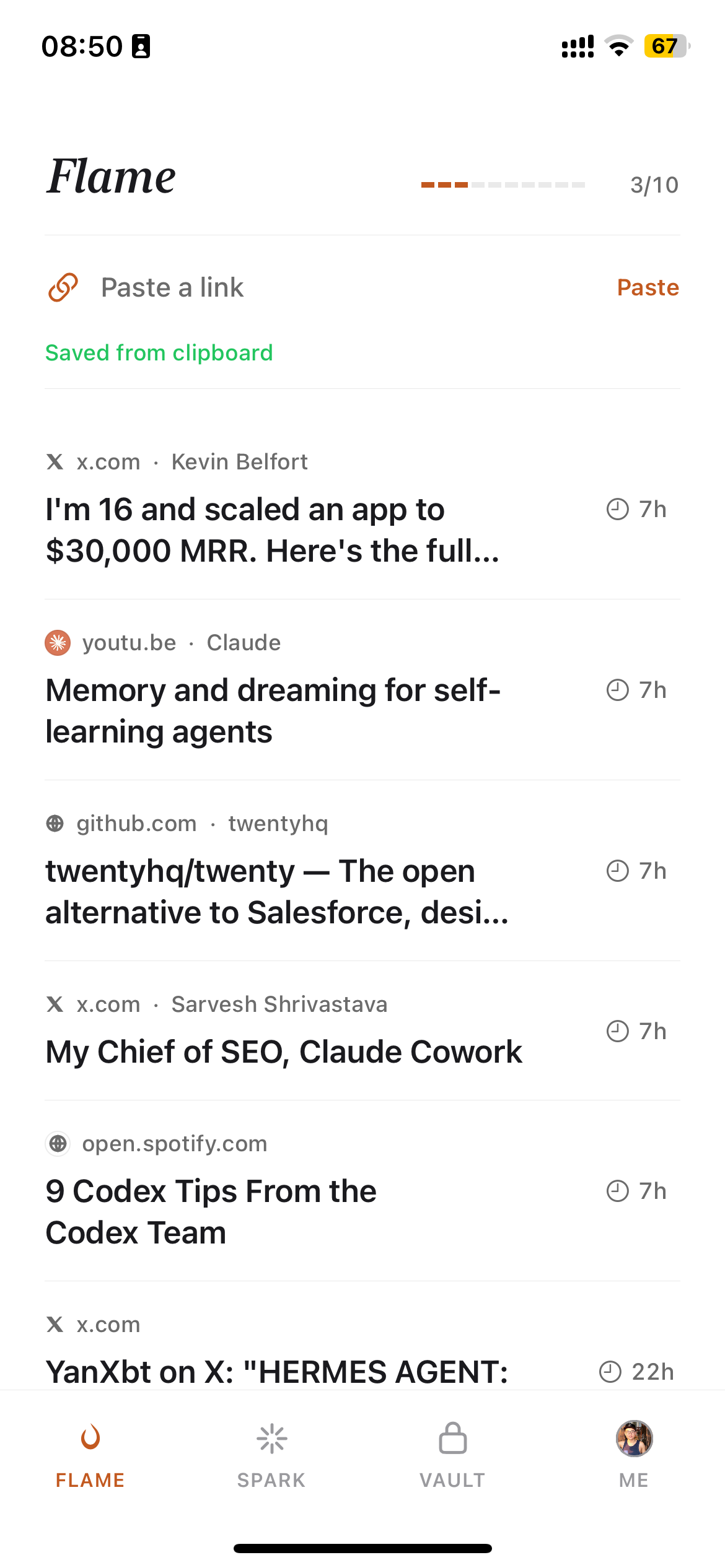
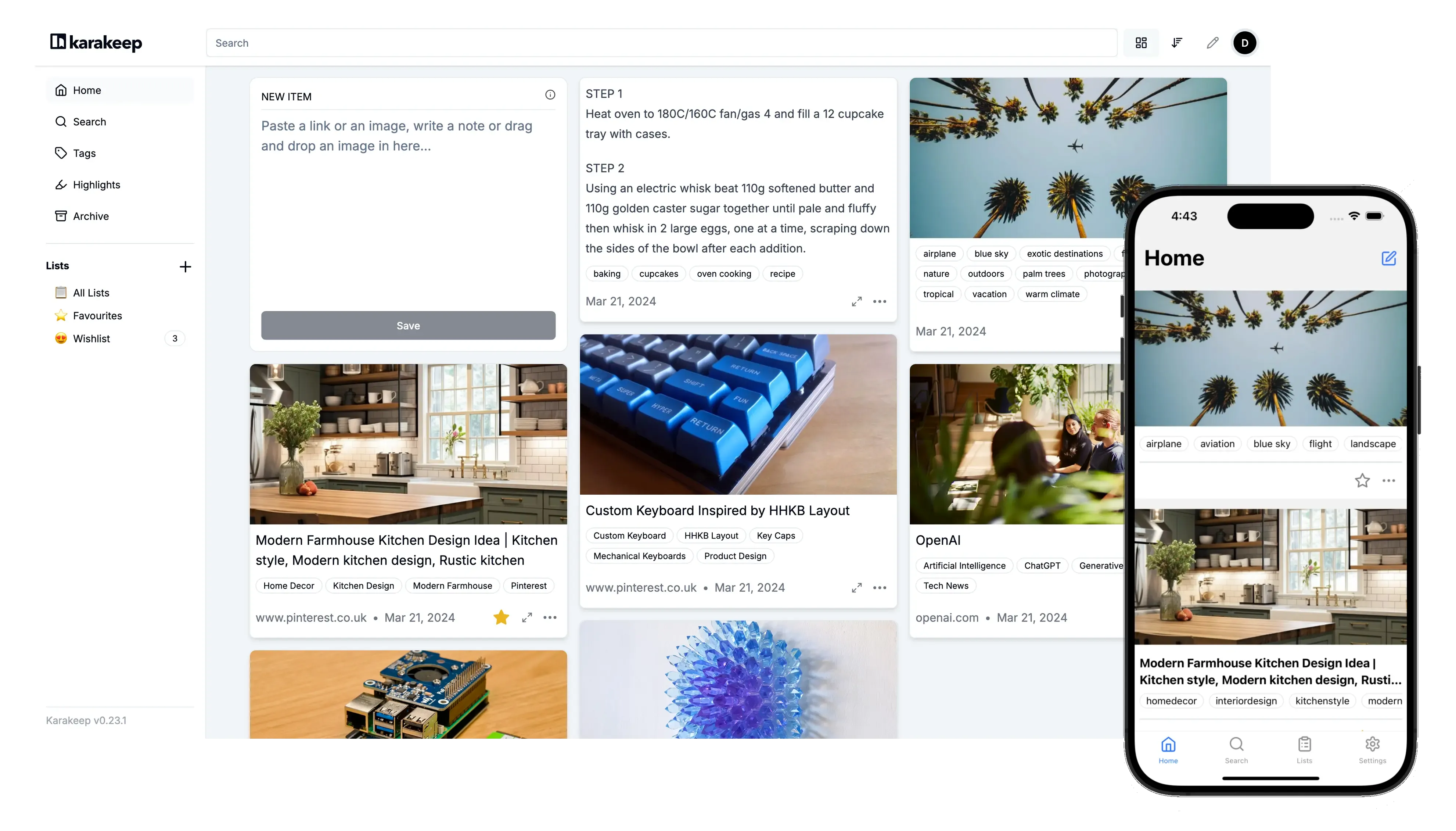
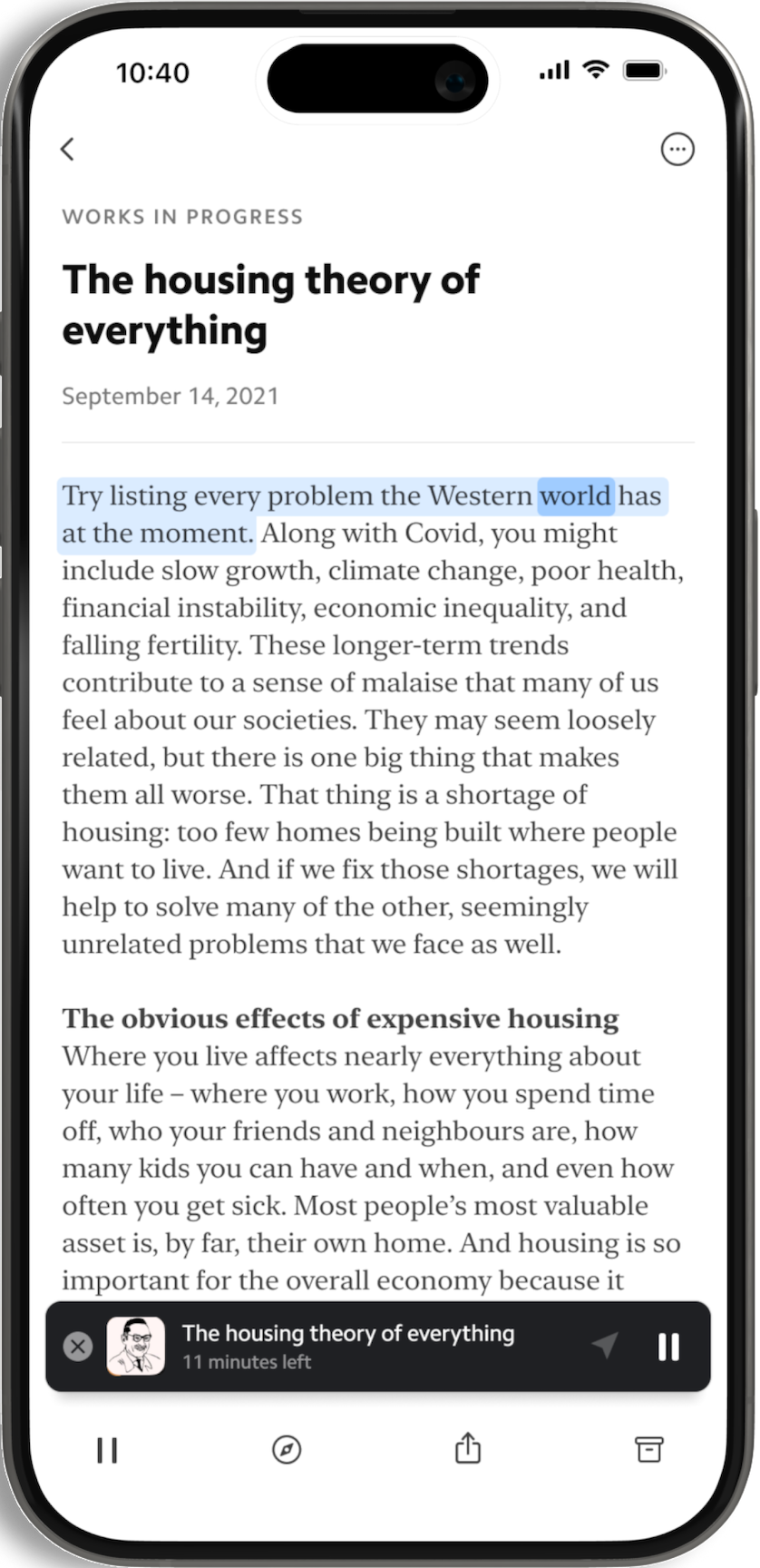
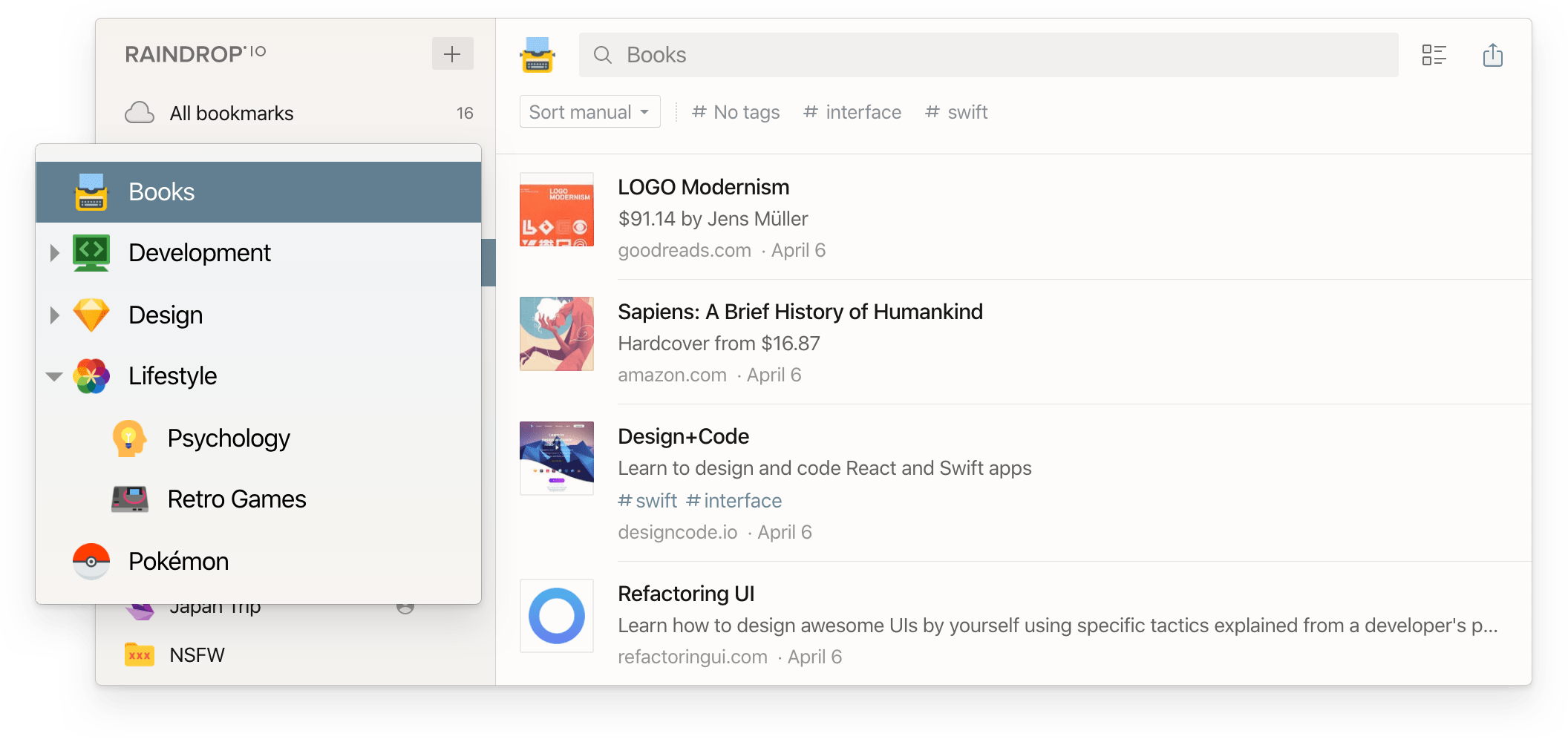
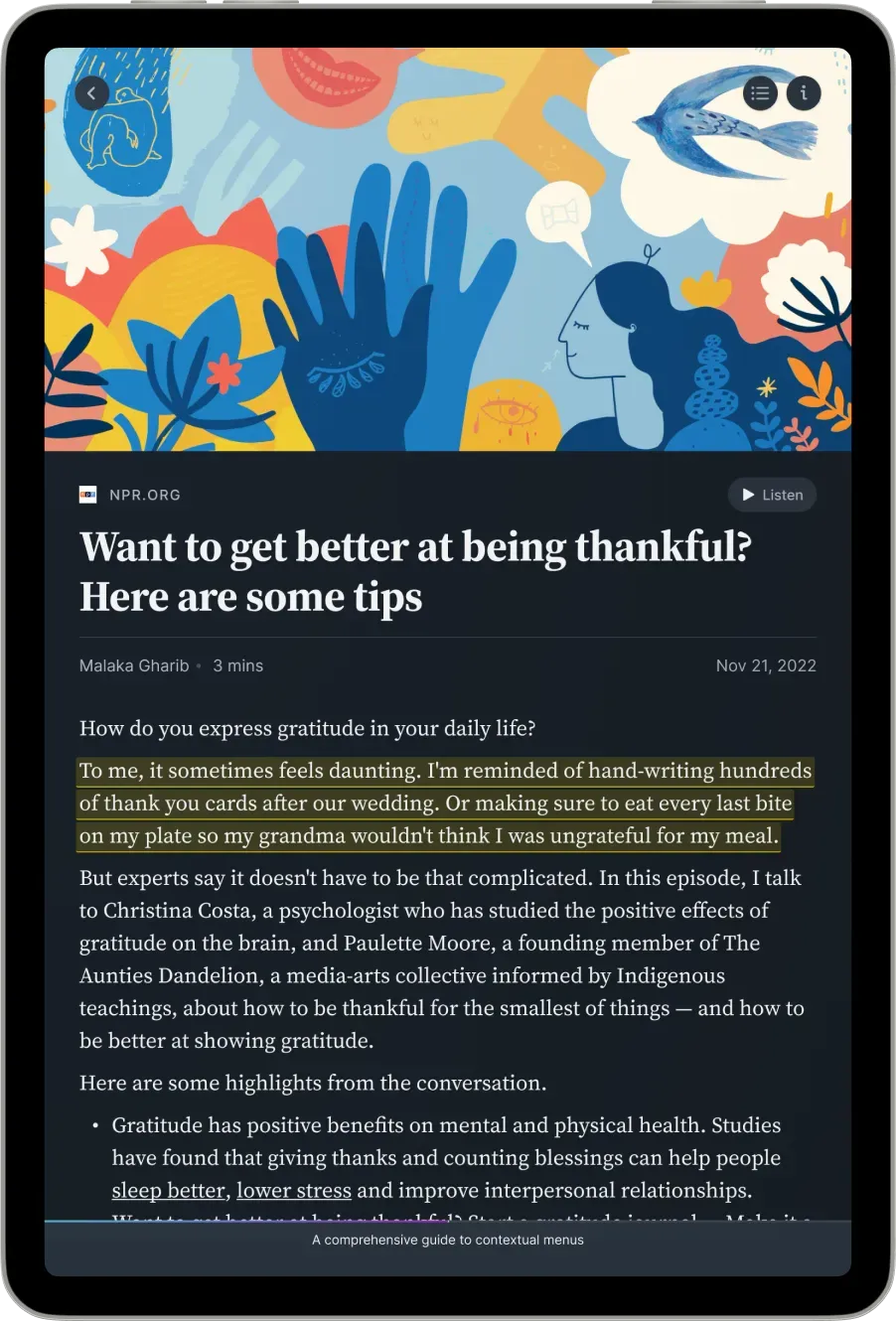
Pocket and Omnivore are not shown — both shut down in 2024–2025. Wallabag is self-hosted and visually similar to a minimal Karakeep, so omitted for space.
Which Read-It-Later App Should You Pick? (Decision Table + Each App's Strengths)
I get asked this every week. The honest answer is "depends on which problem you have." This table maps real problems to real apps — and for each app, what its actual strength is and where it falls short.
| If your real problem is… | Pick | What this app is best at | Where it falls short |
|---|---|---|---|
| I miss Pocket specifically. | Instapaper | 15 years of stable reader UX with zero learning curve. Active development resumed and AI Summaries are now liveon Premium. The closest match to Pocket's philosophy that still exists. | No MCP. PKM sync is minimal. Pro features (full-text search, Kindle, TTS) gated behind Premium. |
| I want bookmarks + saved articles in one library. | Raindrop.io | Genuinely unlimited free tier — bookmarks, collections, tags, devices. Pro adds full-text search, web archive, AI Assistant, and MCP for AI-tool integration. Cross-platform. | Reading mode is secondary to bookmark-management. Not optimized for deep reading sessions. |
| I read consistently and want highlights + review. | Readwise Reader | Ghostreader AI summaries inline, spaced-repetition surfacing of saved highlights, and the strongest Obsidian / Notion / Logseq sync in the category. Podcast saves recently shipped. | No free plan — 30-day trial then $9.99 annual / $12.99 monthly. No MCP yet. Heavy for people who don't actually highlight. |
| I care about the reading surface and want AI Co-Reader / HD TTS / newsletters. | Matter | Typography-focused reading UI. Real free tier covers reader + parsing + extensions. Premium adds HD TTS, AI Co-Reader, newsletter parsing via dedicated email, Kindle export. iOS / iPad / Web. | No MCP. No CLI. Most AI features Premium-gated. iOS-first; Android is less polished. |
| I want to self-host and own my data. | Karakeep or Wallabag | Karakeep — active project with AI auto-tagging, MCP server, full-text search, cloud beta, and iOS/Android/Chrome/Firefox/Safari extensions. Wallabag — boring-reliable veteran on PHP/Symfony with hosted plan ~€11/yr if you don't want to run a server. | Both require setup (Docker / VPS / hosting). Karakeep's cloud is still beta. Wallabag has no native AI. |
| I save a lot and rarely read what I save. | Burn 451 | 24-hour Flame timer forces a decision on every save — read, vault, or burn. Spark/Vault tiers for short-term and permanent keeps. MCP exposes the decision loop (not just a flat bookmark dump) to Claude / Cursor. Free tier today. | iOS-first; Android on roadmap. Offline in iOS app is limited. Opinionated — if you want a quiet 10k-link archive, this is the wrong tool. Pro at $4.99/mo or $48/yr (7-day trial) cap free quotas. |
🤝 If this table feels overwhelming
Here's a 3-step shortcut:
- Identify your strongest pain. "Pile that won't shrink"? "No highlight sync"? "Need to own the data"?
- Pick the row in the table above that names your pain — try that one for a week.
- If it doesn't fit, move to the next-closest row. Three apps in three weeks is enough to tell.
Most apps here have either a free tier or a free trial, so cycling through them costs nothing.
Best Free Read-It-Later Apps in 2026
The truly free options — meaning a real free tier with no card required and a usable product, not just a trial — are Burn 451 (Free tier), Raindrop.io free plan, Karakeep (self-hosted), and Wallabag (self-hosted). Instapaper has a free tier but most useful features are Premium. Readwise Reader has no free plan — only a 30-day trial.
Apps listed alphabetically.
| App | What's free | What costs money |
|---|---|---|
| Instapaper | Unlimited saves, sync, folders, basic reader. | Premium: full-text search, PDF reader, AI Voices/TTS, speed reading, unlimited notes, Kindle integration. |
| Karakeep | All features, if you self-host. Open source. | Cloud beta (BYO server cost otherwise). |
| Raindrop.io | Unlimited bookmarks, collections, tags, devices. Reading mode included. | Pro (~$3/mo): full-text search, web archive, AI Assistant, annotations, broken-link finder. |
| Wallabag | All features, self-hosted. Open source. | Hosted plan ~€11/year if you'd rather not self-host. |
| Burn 451 | The 24-hour timer + core read-later flow is free today. V3 plans to formalize Free quotas (5 Flame, 30 Spark, 100 Vault, 5 AI cards/mo, 30 MCP/day, 1 highlight color). | Planned Pro at $4.99/mo or $48/yr (7-day trial): unlimited Spark + Vault + AI + MCP, 5 highlight colors with notes, Markdown export, search, cloud snapshot. Ships with V3. |
😬 Honest moment
I paid Readwise a full year. Used the highlights feature exactly twice. Didn't renew. That taught me to start free, then upgrade only when the workflow actually proves itself. The same applies to Burn Pro — if you're not hitting Vault 100 or MCP 30/day, you don't need to pay yet.
Read-Later on iPhone: Apps That Actually Work on iOS
iOS is the dominant platform for read-later. Share-sheet integration is the difference between "I'll save this later" and "I saved it already without thinking." Here's how the top apps compare on iOS specifically.
Apps listed alphabetically.
| App | Share sheet | Widget | Offline | Notes |
|---|---|---|---|---|
| Instapaper | ✅ | ✅ | ✅ | Veteran iOS app. Most established. Instapaper offers Summaries. |
| Matter | ✅ | ✅ | ✅ | Typography-focused reading UI. HD TTS on Premium. |
| Raindrop | ✅ | ✅ | ⚠️ Pro only | Strong bookmark UI on iOS. Reading mode is decent but secondary. |
| Readwise Reader | ✅ | ✅ | ✅ | Offline v2 shipped recently. Best for highlight-heavy workflows. |
| Burn 451 | ✅ | ✅ | ⚠️ Limited | iOS-first design. Reader view + tags. Vault for permanent keeps. |
For pure iOS reading, Matter's typography is the one most people notice within an hour. For workflows that touch Obsidian or Notion, Readwise Reader has the strongest sync. For something that doesn't try to teach you a new app, Instapaper — it has been the same Instapaper since 2010 and that's the appeal. For users whose pain is "I save and never read" rather than "I want a prettier reader," Burn 451's 24h timer changes the loop more than any UI tweak will.
One note on offline: Instapaper, Matter, Readwise Reader, and Raindrop.io Pro all download article text to your device for reading without coverage. Burn 451 currently needs a connection in the iOS app — offline is on the roadmap. If you read on flights or subway tunnels, Instapaper or Matter is the safer pick today.
AI Read-Later Apps: Triage, Summaries, MCP
📡 Industry observation
Burn used to lean heavily on MCP (Model Context Protocol) as a differentiator. Now MCP is becoming table stakes — Raindrop ships MCP, Karakeep ships an MCP server, Readwise will likely follow. That makes the workflow opinion more important than the protocol itself: the 24h timer, Spark/Vault, and daily decision loop are what differs once everyone has MCP.
Apps listed alphabetically.
| App | Triage | Summaries | MCP | API |
|---|---|---|---|---|
| Instapaper | — | ✅ AI Summaries (Premium) | — | ✅ |
| Karakeep | ✅ AI auto-tagging | — | ✅ | ✅ |
| Matter | — | ✅ AI Co-Reader (Premium) | — | — |
| Raindrop | — | ✅ AI Assistant (Pro) | ✅ | ✅ |
| Readwise Reader | — | ✅ Ghostreader inline | — | ✅ |
| Burn 451 | ✅ AI auto-categorization (free today; V3 Pro lifts caps) | ✅ Digest summaries | ✅ (V3 Pro lifts daily call cap) | ✅ |
If your real workflow is "ask Claude about something I read last month," any MCP-enabled option works. The flavor differs: Karakeep's MCP is great for self-hosters who want AI to auto-tag. Raindrop's MCP works best when your bookmarks and article saves live in one library. Burn's MCP exposes the decision loop (Flame / Spark / Vault), not just a flat bookmark dump. Readwise's Ghostreader is the most polished inline summary today — just without MCP yet.
Why Most Read-It-Later Apps Quietly Fail (and What I Built)
Here's the opinion I held strongly enough to start writing code: every read-it-later app I'd used optimized the wrong half of the loop.
The save half is solved. Pocket, Instapaper, Matter, Readwise, Raindrop — all of them make saving fast, one-tap from the share sheet, well-tagged, well-synced. The read half is what nobody wants to talk about. Most Pocket refugees I've talked to since the shutdown describe the same thing: a queue that grew faster than they read it, and a vague guilt attached to opening the app. (For the record: Pocket shut down July 8, 2025; its export tool closed November 12, 2025 and account data was queued for permanent deletion after that. If you missed the export window, the data is gone.)
The mistake the category made was treating the queue as storage. Storage with no expiration grows monotonically. A 30-day-old save and a 30-minute-old save look identical in your inbox. You scroll, feel the disappointment loop kick in, close the app, save somewhere else.
Every read-later app that's actually working in 2026 has an opinion about the read half. Burn 451 uses a 24-hour timer matched to the daily window most readers already have:
Commute
15–30 min of unbroken reading time
Lunch
10–20 min alone with a phone
Evening wind-down
20–40 min before bed
The 24-hour window matches that rhythm — read it during one of those slots, vault it for permanent keeping, or let it burn. Forced decision, not arbitrary urgency.1
Readwise Reader does something different: spaced repetition to resurface highlights weeks later. Matter does something different again: lean hard into reading UX so the app itself feels rewarding to open. Pocket and Instapaper, for a long stretch, had no opinion. That's why one is dead and the other is being rebuilt with a renewed roadmap (Summaries, etc.) under active development.
1 Honest aside: I picked 24 hours because my own commute is 25 minutes and I wanted to test it on myself first. The timer was reverse-engineered from my own daily window. Embarrassing but true.
A Real Workflow: From Saved to Read
Listing tools without showing the workflow is the classic failure of these guides. The tool is downstream of the loop. Here's the one I run, post-Pocket, on Burn 451 — adapt it to whichever app you pick:
🧭 Decision aid — 3 questions before you save anything
- Will I actually read this in the next 24 hours? (Y / N)
- Will I reference this in a month? (Y / N)
- Could I just bookmark it in my browser and let it be? (Y / N)
If all 3 are No, don't save it. Trust me. Saving is not free — every save costs you the cognitive load of seeing it sit unread.
- Capture (any time, low effort). iOS share sheet from Safari/X/Hacker News. Desktop: Chrome extension or paste a URL. Zero friction in, zero cognitive load.
- Triage (once a day, 10 minutes).Open the app in the morning with coffee or on the commute. For each save: read it now if short, vault it if I want permanent access, let it go if 24 hours of distance has proven I don't care.
- Read deep (one block, no app switching). Anything that survives triage gets a real reading session. The app stops being a queue and becomes a book.
- Surface later.What I vaulted becomes queryable from Claude via MCP. "What did I save last month about spaced repetition?" returns three vault items inside the chat. No copy-paste.
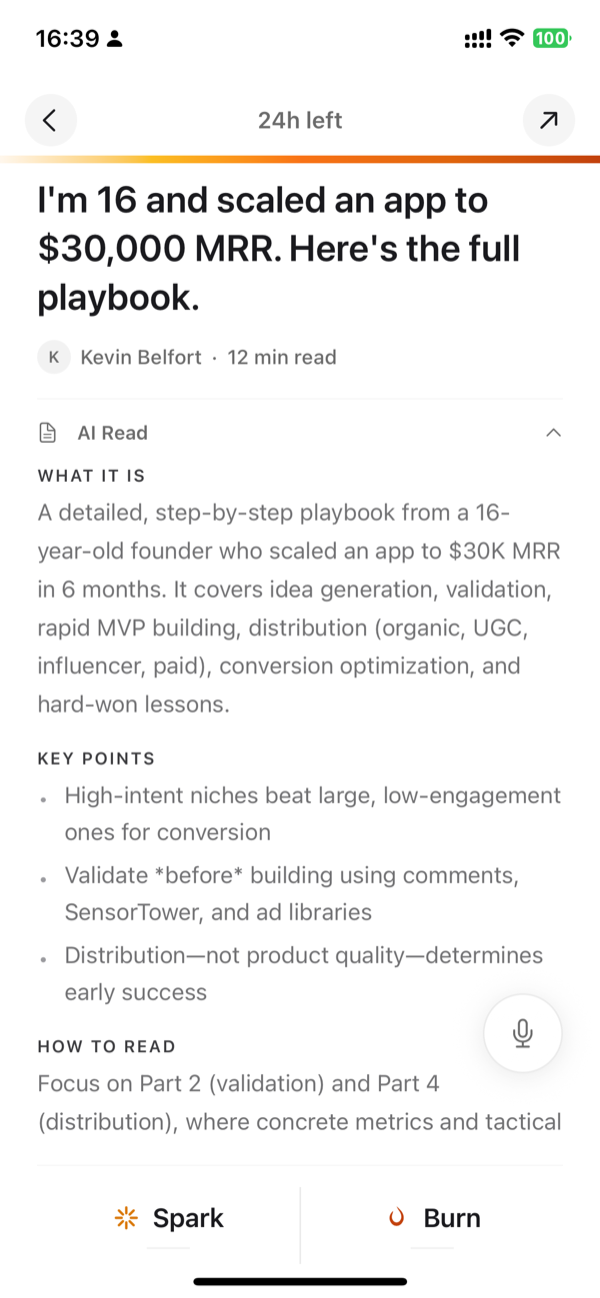
The trick is step 2. Tools that don't hook into a daily digest window (Pocket, Instapaper, plain Raindrop) leak entropy and every queue grows. Tools that do (Burn's timer, Readwise's review surfacing) sync to a rhythm the reader already has.
When None of These Apps Will Help You
I made the call earlier that I'd say when another tool is better, and when no tool is. Here's the honest version.
- You want a passive archive of 10,000 links. Burn's 24-hour timer will annoy you. Use Raindrop or Pinboard. They're built for that, and "built for that" is a real category, not a consolation prize.
- Your real problem is not having time to read at all. No app fixes "I work 70 hours a week and feel guilty about reading." That's a calendar problem. Maybe an AI Co-Reader (Matter) helps by reading articles to you during a walk. Otherwise — block 30 minutes a day and don't open any read-later app at all.
- You're on Android primarily. Burn 451 ships iOS + Web + Chrome in 2026. Android is roadmap, not live. Karakeep, Readwise, Raindrop are all stronger on Android right now.
- You hate opinionated software.Burn is opinionated by design. If "why is this telling me to decide today" annoys you, you'll hate Burn within a week. Save us both time — pick Raindrop free.
- You highlight constantly and live in Obsidian. Burn doesn't compete with Readwise on highlight sync. Don't make Burn do a job Readwise already does well.
The honest pitch for Burn is narrow: if your queue grows faster than your reading and that bothers you, the 24h timer is the mechanism that worked for me — it forces the trade-off instead of hiding it in "maybe later." Otherwise, save your time.
Bottom Line
Every app in this guide is worth picking for the right person. There's no single best — there's matched and mismatched. Pick the one whose opinion matches yours:
- Miss Pocket and want it stable→ Instapaper. Veteran app, active development resumed, Summaries now live on Premium. The closest thing to "Pocket if it had survived."
- Want bookmarks + saved articles in one library → Raindrop. Unlimited free tier is genuinely generous. Pro adds AI Assistant + MCP.
- Read consistently and live in Obsidian / Notion / Logseq → Readwise Reader. The PKM sync layer is the strongest in the category. Ghostreader is the most polished inline AI today.
- Care most about the reading surface → Matter. Real free tier, typography-focused reading UI, Premium for HD TTS / AI Co-Reader / Kindle export.
- Want to own your data → Karakeep (self-hosted with AI tagging + MCP server, active project) or Wallabag (boring-reliable veteran).
- Queue keeps growing and that bothers you→ Burn 451 (this is the one I built). The 24-hour timer forces the trade-off instead of hiding it in "maybe later." Free tier today; Pro at $4.99/mo or $48/yr (7-day trial).
The last one is what I built and the one I use. The honest version of this guide is that none of these are wrong — they're built for different people. Pick the one matched to your actual problem and you'll be fine.
Want to try the timer approach?
Free tier today — no card. Pro at $4.99/mo or $48/yr with 7-day trial.